01
What the XDJ-AZ is & the layout
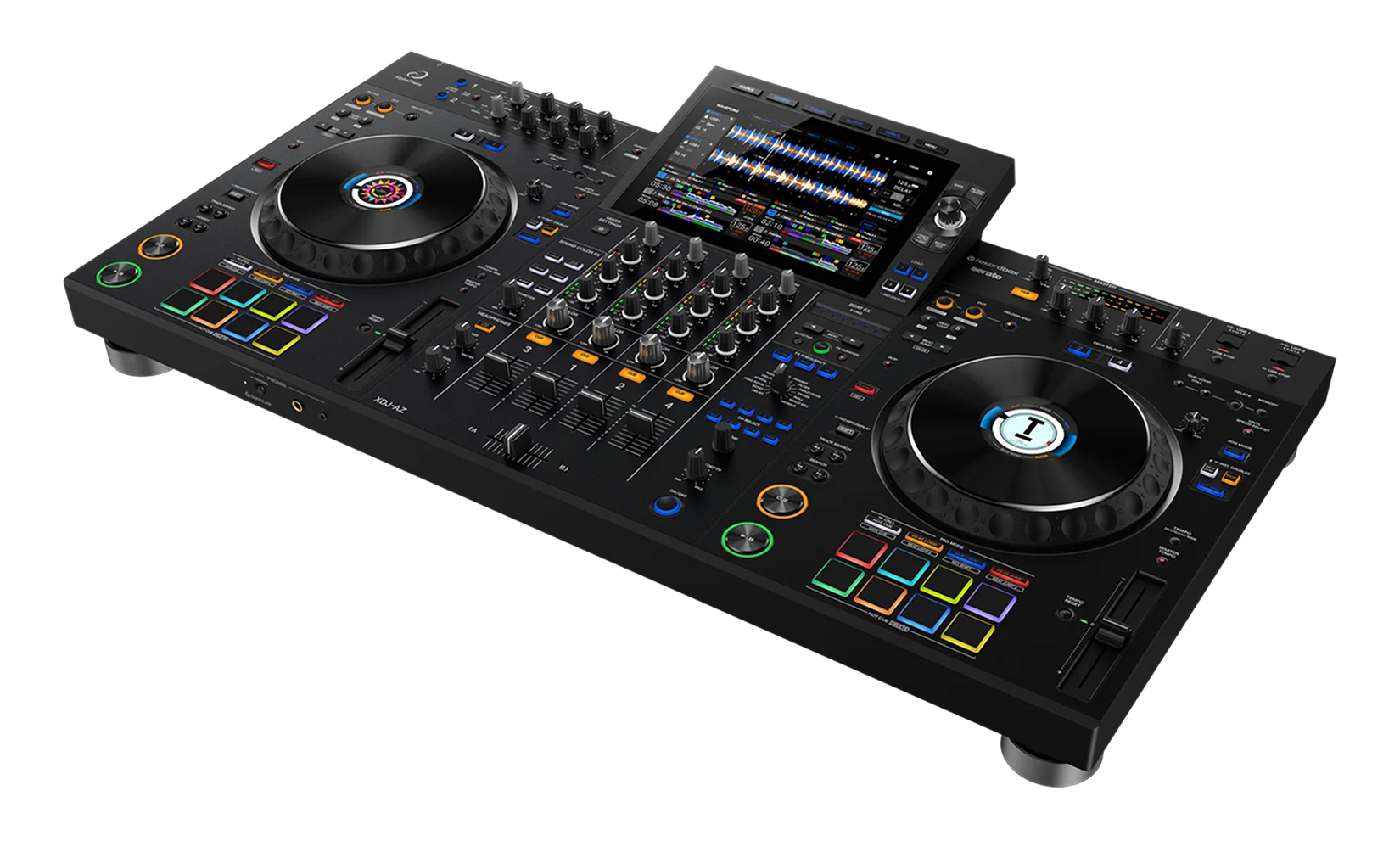
The XDJ-AZ is AlphaTheta's flagship all-in-one — essentially two CDJ-3000 players and a DJM-A9 mixer distilled into one standalone unit, with a large 10.1-inch touchscreen in the middle. The big idea is freedom: it plays straight from a USB stick, an SD card, your rekordbox cloud library or a streaming service over its built-in Wi-Fi, so you can perform a full professional set with nothing but the unit and a pair of headphones.
It's a four-channel, four-deck instrument, so beyond mixing two tracks you can layer a vocal or a loop for richer sets. Because it mirrors club gear, learning it prepares you for the CDJ-and-DJM setups in booths worldwide.
The layout splits into clear zones: the touchscreen and browse controls in the centre for finding music; a deck on each side with a full-size jog wheel, transport, tempo and pads; and the DJM-style mixer down the middle with EQ, Color FX, faders, the crossfader and the Beat FX. Find those zones once and the rest of this guide is simply using them with intent.
02
Get your music in: USB, cloud, Wi-Fi & streaming
The XDJ-AZ plays from more sources than almost anything else. The reliable club staple is a USB stick or SD card prepared in rekordbox on your computer, which carries your analysed tracks, cues and loops. But its built-in Wi-Fi adds two modern options: CloudDirectPlay streams your own rekordbox cloud library with no stick at all, and StreamingDirectPlay plays directly from services including Apple Music — with automatic BPM and waveform analysis so streamed tracks behave like your own. Sign in on the screen and your whole world of music is available.
The feature that sharpens your selection is Touch Preview: touch a track's waveform on the screen and you hear it in your headphones from that exact point, without loading it onto a deck — so you can audition your next track while the current one plays to the crowd. Combine it with the search and filter tools to narrow a huge library by BPM, key or vibe in seconds. Good DJing is good selection, and the XDJ-AZ is built to help you choose well, fast.
03
Play & control: jog, tempo, key & four decks
Set a cue point while paused and Play to start; during playback, Cue snaps you back to that point so you can launch in time, every time. The jog wheel scratches when you touch the top in vinyl mode and bends the pitch when you nudge the outer ring for fine timing fixes; you can tune how heavy the platter feels and how quickly the track stops and starts to suit your style.
The tempo fader changes speed, and Master Tempo keeps the musical pitch steady so faster doesn't mean squeaky vocals. Key Sync shifts the current track into the key of another for clean, consonant blends — the foundation of harmonic mixing. Beat Sync will match tempo and beat-grid instantly when you want it.
And it's a four-deck unit: the deck-select controls let each side run a second deck, so you can keep a vocal a cappella or a percussion loop playing on deck 3 or 4 while you mix decks 1 and 2. Start by getting comfortable on two decks, then add a layered element for a standout moment — four decks reward DJs who plan ahead.
04
Mix on the DJM-style mixer
The XDJ-AZ's mixer is modelled on the DJM-A9 club standard, so the technique you learn here works on the real thing. The core blend is the bass swap: two tracks both carrying bass turn to mud, so before bringing a new track in, cut its LOW EQ to zero, raise its channel fader so its highs and mids sit on top, and at the moment of the switch pull the bass from the old track while pushing it into the new one. The low end hands over cleanly and the transition feels seamless.
Each channel's Sound Color FX knob shapes texture instantly — a filter to strip the bass and build tension, or noise and dub echo for character — and a slow filter sweep is one of the most reliable professional moves there is. The crossfader handles the final left-to-right handover. Faders for level, EQ for clean blending, Color FX for flavour: master that trio and your transitions sound finished. Watch the channel and master meters as you go so your levels stay strong without clipping — clean gain staging is the unglamorous habit that makes everything sound pro.
05
Effects & mixing in key
The XDJ-AZ carries a deep effects set — six Sound Color FX on the channels and fourteen Beat FX in the dedicated section — but more effects only help if you use them with restraint. The Sound Color FX (filter, noise, dub echo and more) are your one-knob, per-channel textures for quick tension and release. The Beat FX are the bigger, tempo-synced effects — echo, reverb, flanger and others — locked to the beat: choose one, set how many beats it spans, and ride its depth. A short echo as a track ends is a smooth, professional way out of a blend; one effect used with timing always beats a pile of effects used at once.
Mixing in key is what turns a good set into a magical one. Tracks in compatible keys blend without clashing, and Key Sync does the shift for you — but train your ears, because once you can hear it you'll choose key-matched tracks on purpose. Combine tasteful effects with key-aware selection and your blends stop sounding like two songs fighting and start sounding like one piece of music.
06
Performing standalone: pads, wireless monitoring & habits
The performance pads are where you go from blending to performing: Hot Cue mode launches your saved moments, Loop mode repeats a section to stretch an intro or build tension, and Beat Jump rearranges a track on the fly. Set your hot cues before the gig and a song becomes an instrument.
A standout convenience is SonicLink — the XDJ-AZ can monitor wirelessly to AlphaTheta's compatible HDJ-F10 headphones with ultra-low latency, so you can cue the next track with no cable tethering you to the unit. And because it's standalone, you can record your whole set straight to a drive: the single best way to improve is to record, then listen back the next day and fix one thing each time.
The habits that make you sound polished are simple and universal: prepare your cues and a tight playlist, keep your gain staging clean, mix in eight-beat phrases so blends land musically, and use Touch Preview to line up the next track early. The XDJ-AZ gives you a whole club in one box, laptop-free — your job is taste, timing and preparation, and this guide has set you up for all three.