01
What the System One is & the layout
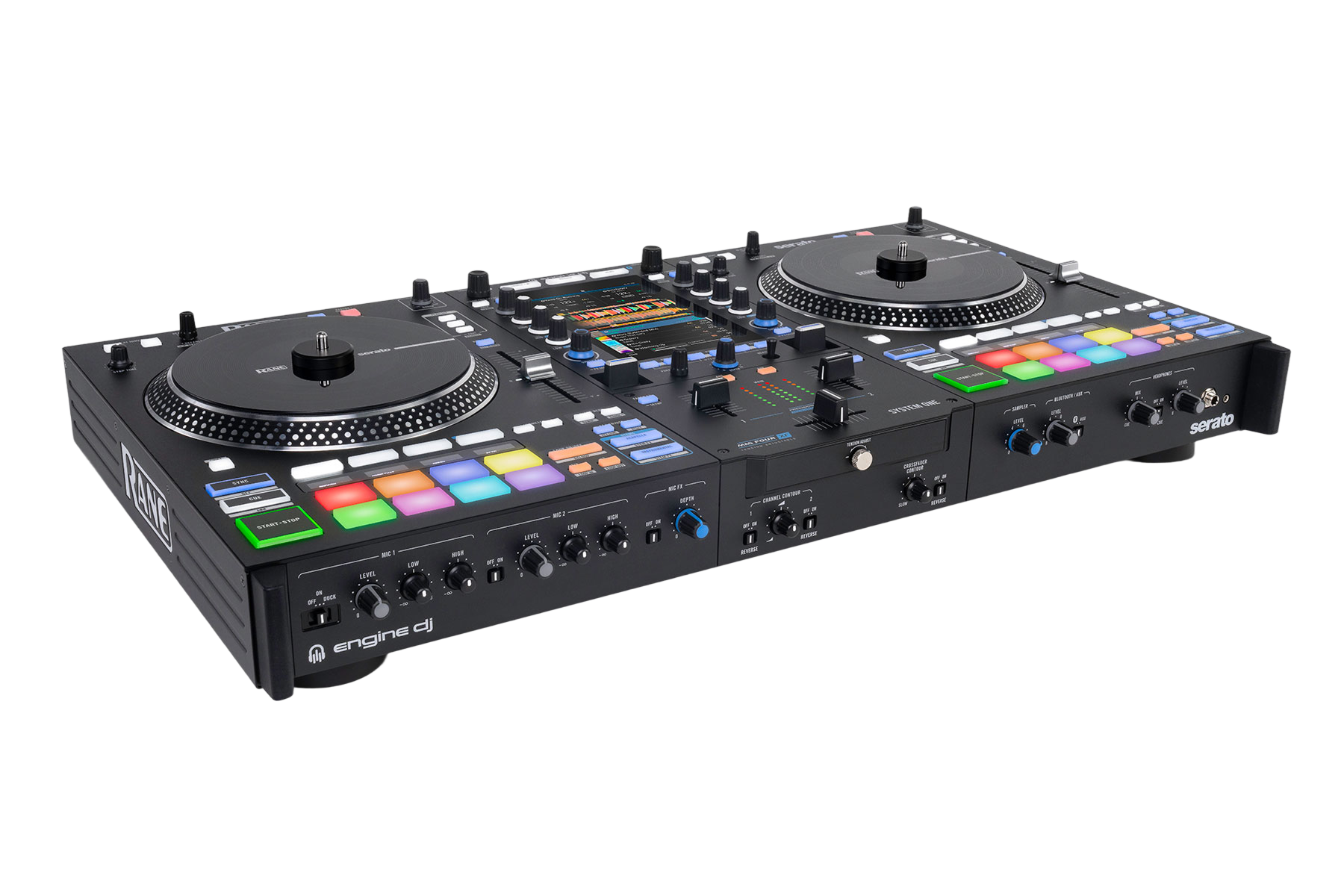
The Rane System One is Rane's first all-in-one standalone DJ system — a two-deck unit with its own screen that plays without a computer. But three things make it stand out from every other standalone. First, the platters are motorized: they physically spin like turntables, which battle and scratch DJs love. Second, it does Stems live — it can split any track into vocals, melody, bass and drums on the fly. Third, OmniSource lets you run the unit's own Engine DJ software on one deck and Serato from a laptop on the other, at the same time, with no reboot.
It runs on Engine DJ, and — importantly for Rane and Serato users — it imports your existing Serato library, keeping your crates, hot cues, loops, BPM and keys.
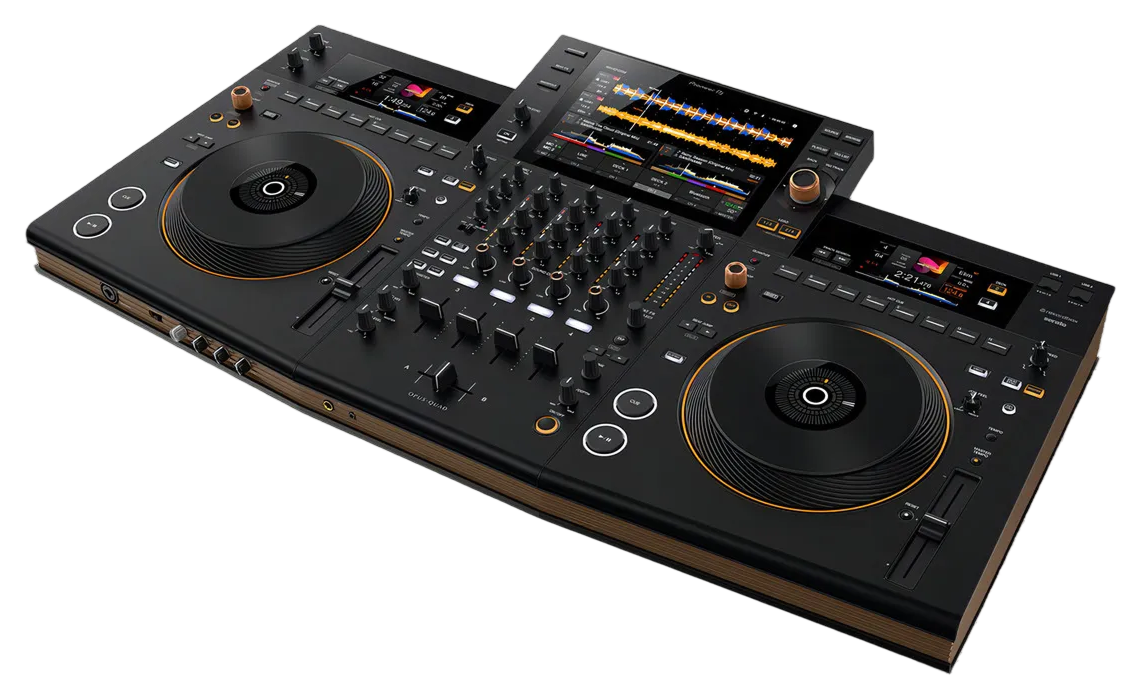
The layout has four zones: the touchscreen and browse controls up top in the centre, the two motorized platters left and right, the mixer down the middle with the FX section, and the performance pads with their little OLED screens beneath each platter. Find those four and the rest of this course is just naming what you already see.
02
Your music + OmniSource: Engine DJ, Serato import & drives
Like other standalone gear, you prep your music once on a computer — here in Engine DJ — which analyses tracks for BPM, key and, crucially, Stems. The big win for Rane and Serato DJs: Engine DJ imports your full Serato library, including crates, hot cues, loops and metadata, so you don't start from scratch. You then export to a USB drive (there's a USB-A and a USB-C port), an SD card, or the internal SSD — an SSD is recommended because Stems are processor-hungry.
On the unit, press Source to pick your media or a cloud source, and use the Scroll/Load knobs to browse and load. Now the headline workflow: OmniSource. It lets you switch between standalone Engine and computer mode without rebooting — so one deck can play from a USB drive while the other runs Serato from a connected laptop. That means you can show up to a gig with a stick, and still drop into Serato for a back-to-back or to use a feature you prefer, all on the same unit.
03
The motorized platters & transport
The System One's platters are motorized — they actually rotate, like a turntable, which gives scratching and beat-juggling a real, tactile feel that touch-capacitive jog wheels can't. You set up the platter with a slipmat and control disc, just like vinyl. Move the platter to scratch or to bend the pitch into time.
Two controls shape the feel. Stop Time sets how long the platter takes to stop when you pause — turn it up for a slow, classic turntable 'spindown', or down for an instant stop. And because the motor isn't always wanted, holding Shift and pressing Slip/Motor disables the motor for that deck, turning the platter into a static jog wheel.
The rest of the transport is standard but powerful: play, cue, sync and key controls, plus Slip mode (jump, loop or scratch while the timeline keeps running underneath, so the track resumes as if you never left). Censor briefly reverses the audio over an explicit lyric then snaps back in time — and it can be reassigned to Silent Cue, which mutes the deck until you hit a hot cue. Beat Jump skips by a set number of beats for quick rearranging.
04
The mixer: faders, EQ, tension & contour
The System One has a proper battle-ready mixer in the middle. Each channel has a Level knob (the gain), three EQ knobs for highs, mids and lows, a Cue button to preview in your headphones, and a Channel Fader. The Crossfader blends the two decks, and Booth and Main knobs set your monitor and house volumes.
What makes it a scratch DJ's mixer is the front-panel customisation. Tension Adjust physically sets how tight or loose the crossfader feels. Crossfader Contour sets the curve — turn it one way for a long smooth blend, the other for a sharp cut that's ideal for scratching. Channel Contour does the same for the up-faders (logarithmic, linear or exponential response). And both the crossfader and channel faders can be Reversed (a 'hamster' switch) to flip their direction. There's also a full input section — two mics with EQ and effects and a talkover 'duck', plus a Bluetooth/Aux input so you can play from a phone — and a Split Cue switch to put your cue in one ear and the mix in the other.
05
Stems: play with the parts of a track
Stems are the System One's signature feature, and once you get them you'll use them constantly. The unit separates any analysed track into four parts in real time — vocals, melody, bass and drums — and gives you hands-on control of each.
The quickest taste is the two dedicated buttons. Acapella instantly mutes the melody, bass and drums to leave just the vocal — perfect for floating an a cappella over the incoming track. Instrumental does the opposite, muting the vocal so you can drop a new singer over the old beat. For finer control, press Stem Level: now your Channel EQ knobs stop being EQ and instead set the level of the vocal, the melody-and-bass, and the drums — so you can pull the drums out of an outro to blend cleanly, or solo a vocal. (When you engage it, the knobs use a gentle 'soft takeover' so levels don't jump.) There's also a Stems pad mode for triggering stems from the pads, and Stem FX that throws an echo tail on just the vocal or just the instrumental as it leaves. Used with taste, Stems turn two tracks into an instant mashup.
06
FX, pads, loops & smart lighting
The System One has four different effects engines, and it helps to know what each is for. The BPM (Main) FX are your big tempo-synced effects — six FX Select buttons you arm and fire with the aluminium Toggle (push to latch it on, pull-and-hold for a momentary hit), with Depth, Beats and a Parameter encoder to shape them. The Sweep FX are one-knob colour effects like a filter. Touch FX live on the screen — drag your finger to perform up to ten effects. And Fader FX turn the channel faders and crossfader themselves into effect controllers.
Beneath each platter are the performance pads, each with a little OLED display above showing the current mode — Hot Cue, Loop, Roll, Sampler, Stems and more — so you never lose track of what the pads do. Looping is both automatic (Loop On/Off, then halve and double) and manual (Loop In/Out, fine-tuned with the platter), with Quantize snapping everything to the grid. You can record your set straight to a drive from the Record menu. And a modern touch: through Engine Lighting the unit connects to Philips Hue and Nanoleaf smart lights over Wi-Fi, so your room reacts to the music automatically — no lighting rig required.