01
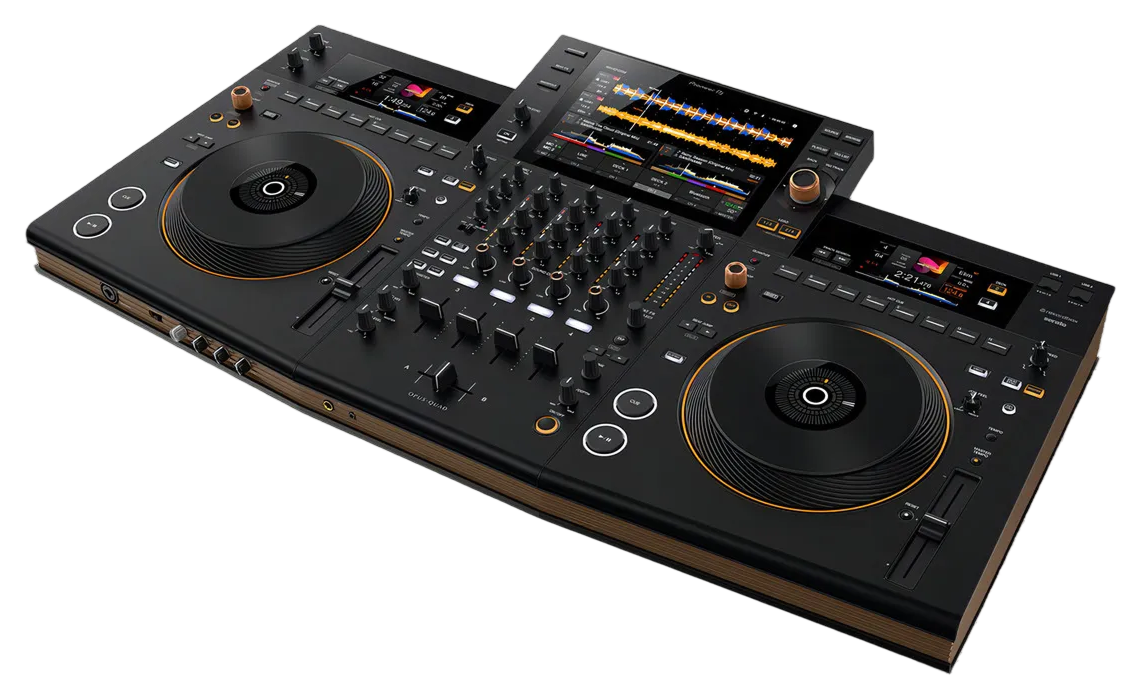
What the Prime 4 is & the layout
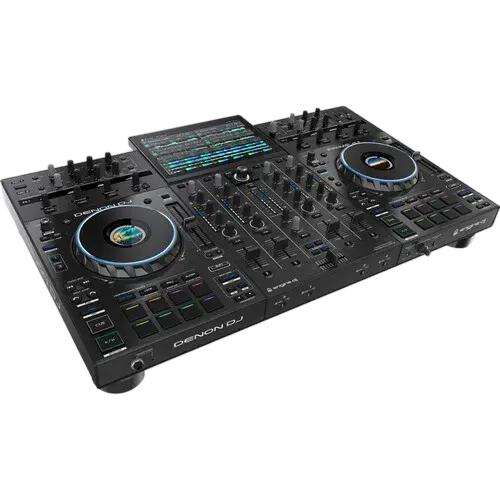
The Denon DJ Prime 4 is an all-in-one DJ system: instead of separate players and a mixer, it puts four decks, a four-channel mixer, effects and a big 10-inch touchscreen into a single unit. The headline is that it's standalone — no laptop required. It plays straight from a USB drive, an SD card, or a hard drive you mount inside it, so the whole setup is just the Prime 4 and your speakers.
The other thing to know up front: it runs on Denon's own software, Engine DJ, rather than Pioneer's rekordbox. You prepare your music in the free Engine DJ app on your computer, copy it to a drive, and the Prime 4 reads your cues, loops and waveforms.
Find the four zones and the rest is easy: the touchscreen across the top, the two capacitive platters left and right, the four-channel mixer down the middle, and the performance pads beneath each platter. Spend a minute locating those and every later lesson is just pointing at something you already recognise.
02
Your music, no laptop: Engine DJ, drives & the screen
Because the Prime 4 is standalone, your prep happens once, on a computer, in Engine DJ — Denon's free library app (the desktop version is also called Engine Prime). You import your music, let it analyse the tracks for BPM and key, set cues and loops, then export to a USB stick, an SD card, or the internal drive. Analysed tracks let every feature — sync, key lock, the waveforms — work properly, so always analyse before a gig.
On the unit, the 10-inch touchscreen is your library. Pick your source (USB, SD, internal drive, or another networked Prime player) and browse with the Browse knob — turn to move, press to open or load. The View button flips between the Library and Performance screens, and holding it opens the menu for source selection, recording and preferences. The real time-saver is search and filtering: narrow a big collection by BPM, key, genre or rating right on the screen, so you always find the next track in seconds. Load it with the Load 1 or Load 2 buttons.
03
The decks & platters
Each side of the Prime 4 is a deck, and the heart of it is the capacitive, touch-sensitive platter. Press the Vinyl button to switch the platter into vinyl mode: touch the top and move it to scratch like a record. With Vinyl off — or if you only touch the side — moving the platter just bends the pitch to nudge a track into time. The platter display in the centre shows artwork, the playhead, your loop size and which deck you're on.
The transport is familiar: Play/Pause, and Cue to set and jump back to a temporary cue point. Track Skip moves between tracks. The Pitch Fader sets the track's speed; when you switch decks the fader uses a 'takeover' LED so the level doesn't jump. Key Lock keeps the musical key steady even as you change speed, and holding it engages Key Sync to match another deck's key. Sync matches tempo and beatgrid to the other deck. And because this is a four-deck unit, the Deck buttons swap each side between Deck 1/3 and Deck 2/4 — hold Shift and press to toggle between two-deck and four-deck operation.
04
The four-channel mixer
Down the middle is a real four-channel mixer. Each channel has a Channel Level knob (the gain, set against the level meters), three EQ knobs to boost or cut highs, mids and lows, a Cue button to hear it in your headphones, and a Channel Fader for its volume. The Crossfader blends between the left and right sides, and each channel's Crossfader Assign switch decides whether it lives on the left, the right, or bypasses the crossfader entirely.
Two things make the Prime 4's mixer special. First, Sweep FX: one knob per channel and a row of buttons (Filter, Echo, Noise, Wash Out). From the centre position, turn a Sweep knob left or right to sweep that effect in — the Filter, for example, is a low-pass one way and a high-pass the other. It's the fastest way to add tension and movement with one hand. Second, the headphone section: Phones Mix blends between your cue and the master so you can preview the next track, Split Cue sends cue to one ear and master to the other, and Phones Level sets the volume. There's also a dual-mic section with EQ, echo and talkover for hosting.
05
Effects: Sweep FX & the FX modules
The Prime 4 gives you two kinds of effects, and they're worth keeping separate in your head. The Sweep FX you met on the mixer are one-knob, per-channel colour effects (Filter, Echo, Noise, Wash Out) — instant, tactile, great for transitions.
The FX modules are the deeper, tempo-synced effects. There are two of them (FX 1 and FX 2). FX On turns a module on; FX Select chooses the effect; the FX Beats buttons set how many beats the effect syncs to, so an echo or reverb lands in time with the music. The Wet/Dry knob controls how much of the effect you hear — keep it low for a hint, push it up for a wash. FX Frequency lets you apply the effect to only part of the sound — just the highs, say, or just the bass — and the FX Parameter knob and button fine-tune the character. The golden rule is restraint: pick one effect, ride the Wet/Dry, and pull it back before it gets muddy. Effects should add energy to a transition, not hide it.
06
Pads, loops, slip & recording your set
Beneath each platter are the performance pads, and four buttons set what they do: Hot Cue (jump to saved points), Loop (manual loops), Roll (momentary loop rolls for stutters), and Slicer (chop a section into playable slices). The Parameter buttons change details within each mode.
Looping has two paths. Manual: press Loop In then Loop Out to mark a section, and it repeats. Automatic: turn the Auto Loop knob to choose a length in beats and press it to drop a perfectly-timed loop — turning it then halves or doubles the loop, and Loop Move shifts it through the track. Beat Jump skips forward or back by a set number of beats for quick rearranging. Slip mode is the safety net: jump around, loop or scratch, and when you stop, the track resumes exactly where it would have been — so you can take risks without losing the groove. Censor briefly reverses the audio (handy over an explicit lyric) then snaps back in time. Best of all, the Prime 4 records your whole set to a drive on the unit itself — open the Record menu from the screen, hit record, and you've captured the mix with no computer in sight.