01
Meet the Inpulse 500 & set it up
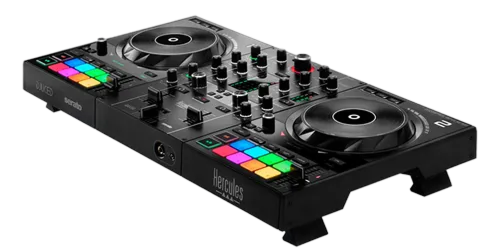
The Hercules DJControl Inpulse 500 is a 2-channel DJ controller aimed squarely at people learning to mix. What sets it apart is that it actively teaches you: its Beatmatch Guide uses lights to show you how to match two tracks by hand, which is the skill most controllers let you skip with a Sync button. Learn it here and you'll be a real DJ on any gear.
It's plug-and-play over a single USB cable and works with two apps: Serato DJ (a Serato DJ Lite licence is included, and it also runs Serato DJ Pro) and Hercules' own DJUCED. Install whichever you like, connect your headphones to the front and your speakers to the master outputs on the back, and you're ready.
Take a moment to learn the map. Each side is a deck: a jog wheel, Play and Cue buttons, a tempo fader, and four-plus performance pads. In the middle is the mixer: a gain knob, three EQ knobs and a filter per channel, the channel faders, and the crossfader. Knowing those zones is half the battle — the rest of this guide is just using them.
02
Load a track and play it
Let's make sound. In your software, use the browser knob to move through your library and the Load buttons to drop a track onto a deck. Press Play to start it, and the jog wheel comes alive.
The jog wheel does two jobs depending on where you touch it. Nudge the outer ring while the track plays and you gently speed it up or slow it down — that's 'pitch bend', and it's how you make tiny timing corrections by hand. Touch the top of the wheel with vinyl mode on and you scratch, like holding a record. While paused, turning the wheel scrubs slowly through the track so you can find the exact spot you want.
That spot is your cue point. Pause, move the jog to the first beat, and press Cue to set it. Now during playback, pressing Cue snaps you straight back there and pauses — so you can launch a track in time, again and again. Hold Cue to play from it and release to jump back. This 'set a cue, launch on the beat' habit is the foundation of every clean mix.
03
Beatmatch by hand — the Beatmatch Guide
This is the lesson the Inpulse 500 was built for. Beatmatching means making two tracks play at the same speed and lining up their beats so they sound like one — and normally it takes months to feel. The Beatmatch Guide turns it into something you can see.
There are two sets of lights. The Tempo guide, next to the tempo fader, shows glowing arrows telling you which way to move the fader to match the other track's speed — slide it the way the arrows point until they go out, and your BPMs match. The Phase guide, on the jog wheels, shows arrows telling you which way to nudge the jog so the beats line up rather than landing slightly apart — push the ring the way they point until they're centred.
So the routine is: get a track playing on deck A, start deck B in your headphones, move the tempo fader until the tempo arrows clear, then nudge the jog until the phase arrows clear. Now both tracks are locked — by your hands, not by a computer. Sync will do this instantly, and it's fine to use, but practise it by hand here: it's the skill that makes you a DJ instead of a button-presser.
04
Mix two tracks: EQ, filter, faders & crossfader
Two beatmatched tracks still sound like a mess if you just slam the fader up — because both have bass, and two basslines together turn to mud. The fix is the mixer, and a simple move.
Each channel has three EQ knobs: LOW (bass), MID and HIGH (treble). The classic blend is the 'bass swap': before you bring the new track in, turn its LOW all the way down. Now raise its channel fader — you'll hear its highs and mids ride on top of the playing track with no clash. When you're ready to switch, drop the LOW on the outgoing track and bring up the LOW on the new one at the same time. The bass hands over cleanly and the crowd barely notices the join.
The filter knob is your other friend: turn it one way to remove the bass (high-pass) for tension, the other way to muffle the highs (low-pass). A slow filter sweep is a smooth way to introduce or retire a track. The crossfader slides the sound from the left deck to the right — set its curve to 'Mix' for long blends or 'Scratch' for sharp cuts. Channel faders for volume, EQ for blending, filter for flavour, crossfader for the handover — that's mixing.
05
The performance pads: cues, loops, slicer & FX
The performance pads are where DJing gets fun. A bank of pads under each deck changes job depending on the selected mode.
Hot Cue mode lets you save favourite moments — a drop, a vocal, an intro — to a pad, then jump straight to any of them with a tap. Set them up before your set and you can rearrange a track live or recover instantly if you start in the wrong place. Loop mode repeats a section: trigger a loop to extend an intro while you set up the next track, or to build tension before a drop. The Slicer chops a section of the track into equal pieces across the pads so you can replay them out of order for a quick edit or stutter. And the Sampler fires your own sounds — air horns, vocal stabs, drum hits — over the mix.
The filter/FX knobs add effects like echo and flanger; a touch of echo as a track ends is a classic, smooth way out of a blend. The golden rule with pads and FX is restraint: one well-placed hot cue or a single echo tail does more than constant button-mashing. Learn one trick at a time and make it clean.
06
Level up: mic, recording & pro habits
You can play a clean mix — now let's make you better. Plug a microphone into the input on the back and set its level with the dedicated knob (watch the light ring: green is good, red means it's too loud and distorting); the 2-band mic EQ helps your voice sit on top of the music for shout-outs.
The single best way to improve is to record your sets and listen back. In Serato or DJUCED, hit record, play a 20-minute mix, then listen the next day with fresh ears — you'll hear exactly where the bass clashed or a transition rushed. Fix one thing each time and you'll improve faster than any tutorial can teach.
A few habits that instantly make you sound polished: watch your levels so the master VU meters sit near the top without going red (clean gain staging); prepare cue points on your tracks before the gig so you're never scrambling; mix in phrases of eight beats so your blends land where the music naturally turns; and keep the bass swap clean. Master those, and the Inpulse 500 has done its job — you're ready for any DJ booth in the world.