01
What the Kontrol S4 MK3 is
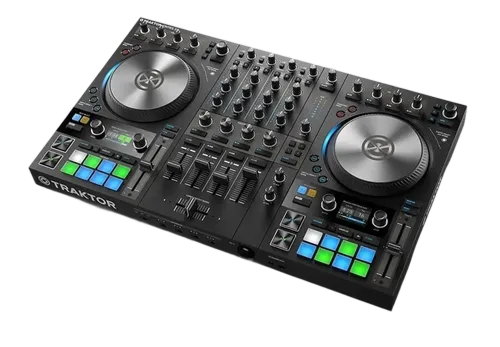
The Traktor Kontrol S4 MK3 is Native Instruments' flagship DJ controller, designed hand-in-glove with Traktor Pro (our Traktor Pro guide covers the software). It's a four-channel unit aimed at creative, performance-led DJs — the kind who want to do more than blend tracks, using Traktor's Remix Decks, Stems and deep effects.
Its headline feature is the Haptic Drive jog wheels: unlike a normal static jog, these are motorised and give physical, haptic feedback — you can actually feel cue points and loop boundaries through the platter as little bumps, a unique tactile way to navigate a track. The S4 MK3 also has built-in screens showing waveforms and info so you can keep your eyes off the laptop, full-size controls, and the layout to drive Traktor's creative tools directly.
It's a premium, deep instrument rather than a beginner's first controller — it shines when paired with Traktor's power. This guide covers setting it up, the Haptic Drive jogs and screens, the mixer and effects, and the Remix Decks and Stems — with the universal DJ skills in our Techniques section underpinning it all.
02
Setup with Traktor & loading
The S4 MK3 is built for Traktor Pro, and the two are designed to work seamlessly together — connect the controller over USB, open Traktor, and everything maps automatically, from the decks and mixer to the Remix Decks, effects and Stems controls. The unit even has a built-in audio interface, so your headphones and speakers connect to it. (A version called the S4 also comes bundled with Traktor software.)
Prepare your library in Traktor first: import and analyse your tracks so they have accurate BPM, tight beat-grids and key (our Traktor Pro and Organize Your DJ Library guides cover this), and set hot cues during prep — which become especially useful here, since the Haptic Drive jogs let you feel them. Then browse and load tracks using the controller's browse controls and the on-board screens.
Because the S4 MK3 is so tightly integrated with Traktor, there's very little fiddling — it just works as a complete, premium front end for the software. With your library prepared and a track loaded, you're ready to explore what makes this controller special: the jogs, the screens, and Traktor's creative tools.
03
Haptic Drive jogs & screens
The Haptic Drive jog wheels are what set the S4 MK3 apart. They're motorised, so they can spin like a turntable for an authentic feel, and — uniquely — they deliver haptic feedback: as you move through a track, you physically feel little bumps and resistance at your cue points and loop edges through the platter. It's like the track has texture you can feel with your fingers, which makes navigating, setting loops and triggering cues remarkably intuitive once you get used to it.
You can use the motorised platter to scratch and cue with real vinyl-like feel, and the haptic feedback gives you a tactile sense of where you are in the track without looking. The built-in screens complement this, showing clear waveforms, your cue and loop markers, and track info, so your eyes stay on the gear and the crowd rather than the laptop.
This combination — feel through the jogs, see through the screens — makes the S4 MK3 a uniquely hands-on, eyes-up controller. Spend time getting used to the haptic feedback; it's unusual at first, but it becomes a genuinely useful way to perform precisely by feel, which is exactly the creative, tactile control Traktor DJs value.
04
The mixer, effects & four decks
The S4 MK3's mixer is a four-channel design with the essentials per channel — gain, three-band EQ, a cue and a fader, plus the crossfader. Clean mixing works as on any mixer: set your levels, then use the bass swap (kill the incoming LOW, layer it in, swap the bass at the transition) for muddy-free blends (our Gain Staging & EQ Mixing guide covers it). Four channels let you layer tracks for richer, creative sets — a natural fit with Traktor's Remix Decks.
The controller maps directly to Traktor's renowned effects engine — one of the best in DJ software — so you can grab and perform its deep echoes, reverbs, filters and creative effects with hardware controls rather than a mouse. Used tastefully (our Filters & FX guide covers the principles), Traktor's FX give you a serious creative palette.
This tight hardware-software integration is the whole point of the S4 MK3: every powerful thing Traktor can do, you control by hand. The mixer and effects are the foundation; the next lesson covers the Remix Decks and Stems that make the pairing truly creative.
05
Remix Decks, Stems & who it's for
The S4 MK3 really comes alive with Traktor's signature creative features (covered in our Traktor Pro guide). The performance pads and controls map to the Remix Decks — letting you trigger loops and samples to build and arrange grooves live, like a mini production tool in your set — and to Stems, NI's real-time track separation, so you can isolate vocals, drums and instruments for live mashups, all with dedicated hardware control. Combined with the Haptic Drive jogs and screens, this makes the S4 MK3 a deeply creative, hands-on performance instrument.
Who's it for? Serious, creative DJs — especially in electronic music — who are committed to Traktor and want the flagship hardware to drive it, with the unique Haptic Drive feel and four-deck, remix-focused performance. It's a premium controller, not an entry-level pick.
If you're a beginner, a simpler controller (and our First DJ Setup guide) is a better start; if you want maximum creative depth in the Traktor ecosystem, the S4 MK3 is the top of the line. Pair it with our Techniques section for the fundamentals and the Traktor Pro guide for the software, and you have one of the most creative DJ setups available.