01
What the Kontrol S2 is
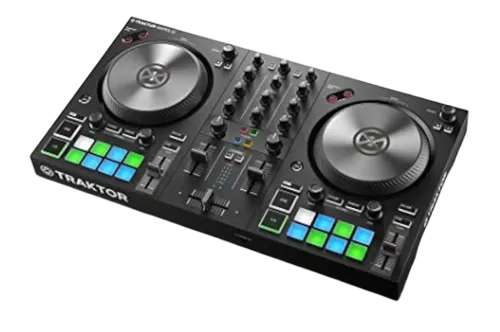
The Traktor Kontrol S2 is Native Instruments' compact two-channel controller — the friendly, portable way into the Traktor ecosystem. Where the flagship S4 MK3 (in our guides) is a deep four-channel powerhouse, the S2 is smaller, simpler and more affordable, aimed at beginners and DJs who want a travel-friendly setup. It typically comes bundled with Traktor software, so it's a complete package to start mixing.
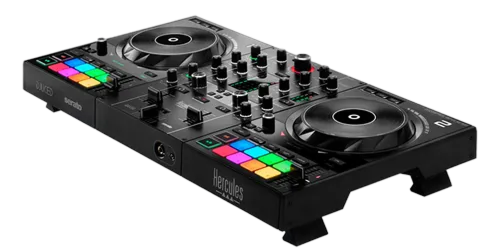
It has the essentials in a small footprint: two jog wheels, a two-channel mixer (EQ, faders, crossfader), performance pads for cues and loops, and an FX section — and a built-in audio interface so your headphones and speakers connect to it. Its compact size makes it genuinely portable, easy to fit in a bag and play anywhere.
For someone starting out (or wanting Traktor on the go), the S2 is an approachable, capable entry point. This guide covers setting it up, the controls, and mixing on it — and because the universal DJ skills in our Techniques section are the same on any controller, everything you learn here transfers to bigger gear later.
02
Setup & loading tracks
Setup is simple: connect the S2 to your laptop over USB, open Traktor (which usually comes bundled with the controller), and it maps automatically. The S2 has a built-in audio interface, so plug your headphones into it and connect it to your speakers. You're ready to mix.
Prepare your library in Traktor first — import and analyse your tracks so they have BPM, beat-grids and key (our Traktor Pro and Organize Your DJ Library guides cover this), and it's worth setting a few hot cues during prep. Then use the browse controls to find a track and load it onto a deck.
That's genuinely all it takes to start. The S2's appeal is this simplicity — it's a grab-and-go package: a small controller, the Traktor software, headphones and any speakers, and you can mix. With a track loaded and playing, you're ready to learn the controls, starting with the decks and the jog wheels — and since they work like any controller's, the skills you build here are the foundation for everything.
03
Decks, jogs & beatmatching
Each side of the S2 is a deck. Play/Pause starts and stops; Cue sets a temporary launch point and snaps you back to it during playback, so you can drop a track precisely on time. The jog wheels let you nudge the pitch (touch the outer edge while playing) for small timing fixes, or scratch (touch the top in vinyl mode).
To beatmatch, get one track playing, start the next in your headphones, and use the tempo control to match their speeds, then nudge the jog so the beats line up — and there's Beat Sync if you want it. The universal skill of matching tracks by ear is taught fully in our How to Beatmatch guide, and the S2 is a perfectly good place to learn it: the controls work just like any controller's, so the timing and listening skills you build transfer directly to bigger gear.
The S2's jog wheels are smaller than a flagship's, but they do everything you need to learn — cueing, pitch bend, basic scratching. Focus on getting clean, in-time launches and a solid beatmatch here, and you've built the foundation that every other part of DJing sits on.
04
Mixing, pads & effects
The S2's two-channel mixer has the essentials: per-channel EQ, a fader, and the crossfader. The core blend is the bass swap — cut the incoming track's LOW, raise its fader so the highs and mids layer cleanly, then swap the bass over at the transition (our Gain Staging & EQ Mixing guide covers it in full). Set your levels first so both tracks are equally loud. This clean two-track blending is the heart of DJing, and the S2 does it well.
The performance pads handle Hot Cues (jump to your saved moments) and loops (extend a section or build tension), giving you creative control beyond just blending — recalled from your prepared Traktor library. The FX section lets you add Traktor's effects, like echo and filter, to accent transitions (our Filters & FX guide covers tasteful use).
Everything here is the same skill set you'll use on any controller — the S2 just packages it compactly. Build clean mixing first, then add tasteful cues, loops and effects. The universal techniques in our Techniques section apply throughout, and mastering them on the S2 prepares you for anything.
05
Where the S2 fits
The Kontrol S2 is for beginners entering the Traktor world, and for DJs who want a compact, portable Traktor setup they can throw in a bag and play anywhere. Its strengths are simplicity, portability and the bundled software — a complete, affordable package to learn on. Its trade-offs are the things you'd expect from an entry two-channel unit: smaller jogs, fewer channels and features than the flagship S4 MK3, and less of Traktor's deep creative hardware control.
None of that holds back your learning. You can develop every fundamental — beatmatching, EQ mixing, cues, loops, phrasing — on an S2, and they all transfer when you upgrade. Many DJs start on a compact controller like this and only move up once they know exactly what advanced features they want.
So if you're drawn to Traktor and want an accessible, portable start, the S2 is a smart entry. When you're ready for more — four channels, the Haptic Drive jogs, deep Remix Decks and Stems control — the S4 MK3 (in our guides) is the step up. Pair the S2 with our Techniques section and the Traktor Pro guide, and it'll take you from your first mix a very long way.