Home/Controller/Reloop Beatmix
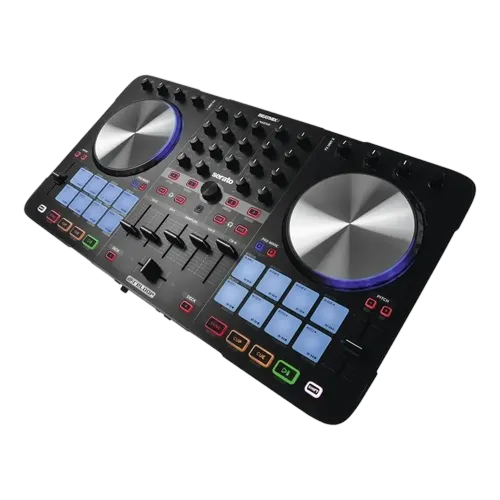
Performance-Pad ControllerReloop Beatmix Performance-Pad Controller
Reloop · Beginner

Reloop Beatmix

A pad-focused beginner controller built around 16 expressive performance pads. Learn to DJ and get creative with cues, loops and the sampler early.

4
Lessons
Controller
Type
Beginner
Level
Overview

Everything the manual says — minus the headache.

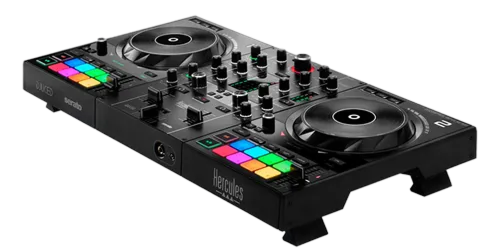
The Reloop Beatmix is an affordable Serato DJ Lite controller whose headline feature is its bank of large, responsive performance pads — far better pads than you usually find at this price. It's aimed at beginners who want to get past simple beatmatching quickly and start performing with hot cues, loops, slices and the sampler. This guide gets you mixing first, then teaches you to use those pads as the instrument they're meant to be.

  • Set up the Beatmix with Serato DJ Lite
  • Mix two tracks cleanly with EQ and the crossfader
  • Use the four pad modes — cues, loops, sampler and more
  • Build a short, energetic performance routine
Advertisement
Lessons
01

Built around the pads

Most budget controllers treat performance pads as an afterthought — small, mushy and cramped. The Reloop Beatmix flips that: its big, velvety RGB pads are the star, and they feel good enough to actually perform on. That makes it a smart pick for a beginner who's drawn to the creative, finger-drumming side of DJing rather than only blending tracks. Underneath, it's a straightforward two-channel Serato DJ Lite controller: two jog wheels, a proper mixer section with EQ and a crossfader, and tempo faders. It's USB-powered and plug-and-play, so setup is painless. The approach in this guide reflects the hardware. We'll cover clean mixing because that's the non-negotiable foundation, but we'll spend real time on the pads — hot cues, loops, the sampler — because that's where the Beatmix shines and where you'll have the most fun while you learn.


02

Setup & your first blend

Connect the Beatmix over USB and install Serato DJ Lite; the controller maps automatically. Headphones go in the front, speakers connect to the rear, and you're ready. Import music and let Serato analyse it so the BPM and beat grids are accurate — that accuracy is what makes the loop and sync features behave. Load a track on each deck and practise the core move: match tempos (our How to Beatmatch guide explains doing it by ear, and our When to Use Sync guide covers the Sync button honestly), then blend across with the crossfader. Use the three-band EQ to swap bass between tracks so two kick drums never fight — our Gain Staging & EQ Mixing guide breaks this down simply. Don't rush past this. A clean blend is the canvas; the pad tricks in the next lesson only sound good on top of solid mixing. Get two tracks moving smoothly into each other before you start performing.

03

The four pad modes

The pads switch between modes, and learning them is where the Beatmix earns its keep. Hot Cue mode lets you set markers anywhere in a track and jump to them instantly — great for relaunching a drop or building a quick edit. Loop mode captures a section and repeats it, so you can extend an intro or hold a groove while you set up the next track. The Sampler fires one-shot sounds and stabs over your mix, and Slicer-style modes chop a section into playable pieces. Start with hot cues: load a familiar track, drop cues on its main sections (intro, drop, breakdown), and practise jumping between them in time. Then add a loop to extend a phrase. Our Looping & Hot Cues guide goes deeper on the musical thinking behind these. The pads reward practice with muscle memory — once your hands know where the drop cue lives, you can perform without looking, which is exactly what makes a set feel live rather than pressed-play.

04

A short performance routine

Now put it together. Pick two tracks you know well, set hot cues on the key sections of each, and plan a 60-second routine: blend track one in, use a loop to extend its breakdown, jump a couple of hot cues to re-trigger the drop, then mix into track two. The aim is a small piece of performance that feels intentional, not random. Keep it musical. Triggering cues and loops only sounds good when they land on the beat and respect the song's phrasing — our Phrasing & Song Structure guide explains where those landing points are. A single well-timed re-trigger beats a flurry of mistimed ones. The Beatmix is built for exactly this kind of hands-on play, and routines like this are how you develop real performance instincts cheaply. When you outgrow it, those instincts carry straight over to bigger gear — our First DJ Setup guide covers where to go next, but you can get a long way creatively on the Beatmix alone.

Techniques to practise
Related gear
Advertisement