01
What the DDJ-XP2 is
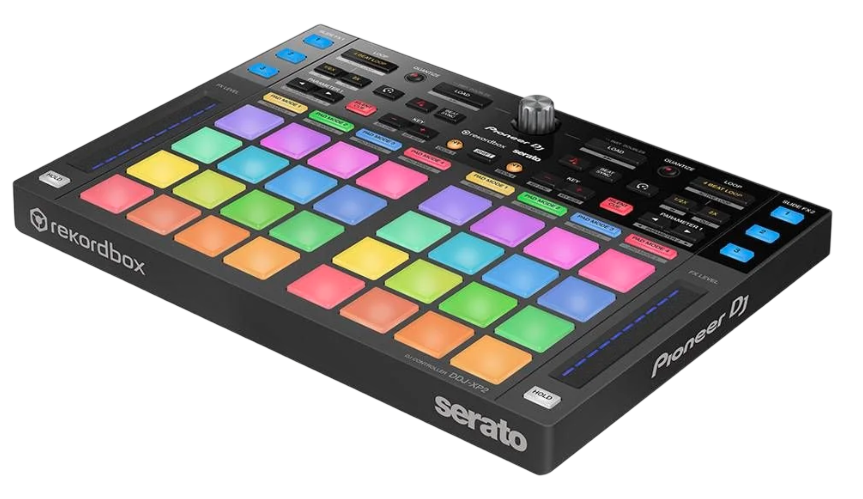
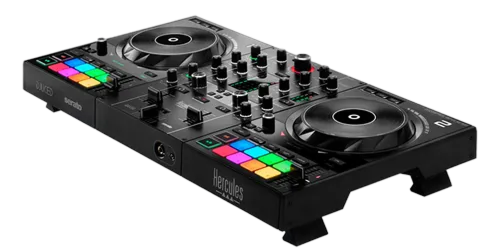
The DDJ-XP2 isn't a DJ controller in the usual sense — it has no jog wheels, no faders and no sound card. Instead it's an add-on: a slim unit packed with performance pads and a few controls that plugs into your laptop and adds hands-on creative control to rekordbox or Serato. Think of it as bolting a bank of performance pads onto a setup that doesn't have them.
Why would you want that? Plenty of setups lack good pads. If you play on club CDJs and want richer hot-cue and loop control, or you mix on turntables with DVS (which have no pads at all), or you use a compact mixer, the XP2 gives you sixteen-plus expressive pads for hot cues, loops, pad FX, sampler and more — turning a pads-light setup into a performance-capable one.
It works with both rekordbox (it was designed alongside rekordbox) and Serato. Because it's purely a control surface, it's small, light and easy to add to a rig. This guide covers what its pads do, how to integrate it, and the kind of DJ it makes sense for.
02
The pads & modes
The XP2's pads work through modes, just like the pads on a full controller. Hot Cue mode lets you save and instantly jump to your favourite points in a track — the drop, a vocal, the intro — so you can rearrange a song live or relaunch it precisely. Loop modes (auto and manual) repeat sections to extend an intro or build tension. Pad FX let you trigger effects from the pads. There are also modes for Beat Jump, the Sampler, and (depending on software) key shift and more.
Because it has two banks of pads (one per deck) plus mode buttons and a few controls like a needle-search/parameter strip, you get full, expressive performance control over two decks' worth of cues, loops and effects — all from one compact unit.
The value is having these tools under dedicated, colour-coded pads rather than buried in software menus or absent entirely. Our Looping & Hot Cues and Filters & FX guides cover the creative use of these tools; the XP2 simply gives you a great physical surface to perform them on, especially when your main gear doesn't.
03
Adding it to your setup
The XP2 shines as the missing piece in setups that lack pads. The classic use is with a DVS turntable rig: turntables and a battle mixer give you the feel and the cut, but no performance pads — add an XP2 and suddenly you have hot cues, loops and pad FX to combine with your scratching, a powerful hybrid. It's just as useful alongside club CDJs if you want deeper, more expressive cue and loop control than the players offer, or with a compact controller or mixer that's pads-light.
Setup is simple: connect the XP2 to your laptop running rekordbox or Serato over USB, and it maps to the decks in your software. It sits on your table next to your other gear, adding its control surface to whatever you're already using. Because it carries no audio, it doesn't change your signal path — it's purely extra control.
The one requirement is that you're running rekordbox or Serato on a laptop (or compatible setup), since the XP2 controls the software. For a DJ whose main gear feels limited on creative pads, it's an easy, affordable way to expand without replacing anything.
04
Performing with the extra pads
With the XP2 added, your performance options expand. Set hot cues on your tracks during prep, and live you can fly between a track's sections, juggle between two cue points for a quick edit, or relaunch instantly if you start in the wrong place — all on dedicated pads. Drop an auto loop to extend an intro while you set up the next track, or roll a short loop into a drop to build tension. Trigger pad FX to accent a transition, or fire samples for a signature stab.
The XP2 is especially fun combined with turntables: scratch on the decks while firing hot cues and loops from the pads, blending turntablism with modern performance tools. For open-format and creative DJs, that combination is genuinely expressive.
As always, restraint and timing make these tools shine — a few well-placed cue and loop moves beat constant pad-mashing. Our Looping & Hot Cues guide covers using them musically. The XP2 doesn't change the fundamentals of DJing; it just gives you more hands-on ways to perform creatively on top of a solid mix, especially on setups that otherwise couldn't.
05
Who the DDJ-XP2 is for
The XP2 is a niche but genuinely useful tool, and knowing whether it fits you is simple. It makes the most sense if: you play on turntables with DVS and want performance pads; you use club CDJs or a compact setup and crave deeper, more expressive cue, loop and FX control; or you've built a rig around rekordbox or Serato and want to add a dedicated performance surface without buying a whole new controller. For these DJs, it's an affordable, compact upgrade.
It makes less sense if you already use a full controller with plenty of pads (you'd be duplicating what you have), or if you play purely standalone on CDJs/XDJs with no laptop (the XP2 needs software to control). It's an accessory, not a complete instrument — it adds to a setup, it doesn't replace one.
So think about your gear and your style: if your performance is held back by a lack of good pads, the XP2 fills that gap elegantly. Combined with the creative skills in our Looping & Hot Cues and Filters & FX guides, it lets a pads-light setup perform like a much bigger one — a smart, targeted addition for the right DJ.