01
What the DDJ-REV7 is & the battle layout
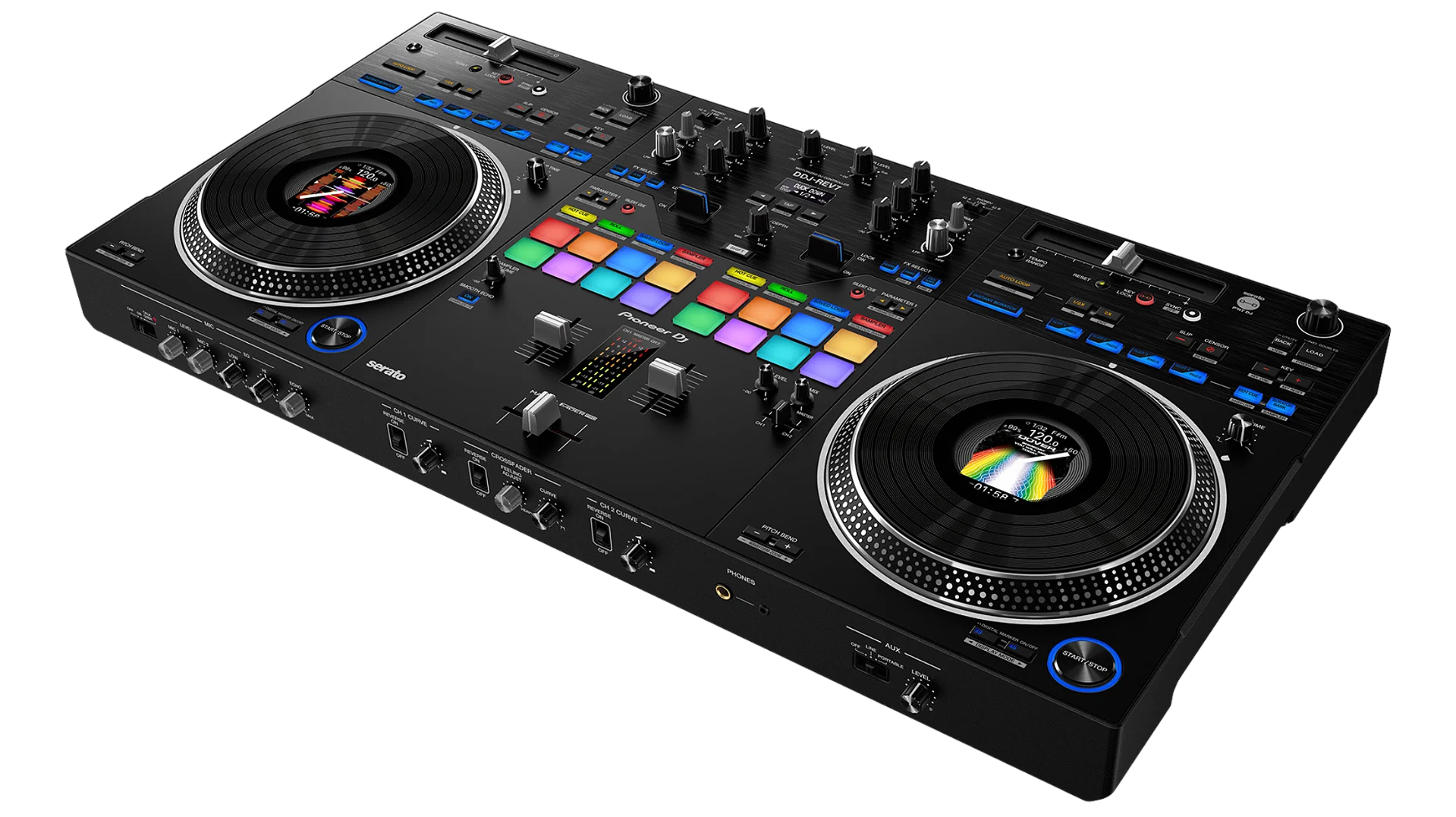
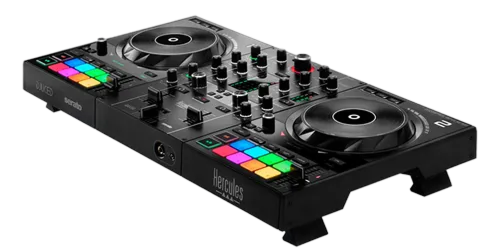
The DDJ-REV7 is Pioneer DJ's flagship battle controller, built for Serato DJ Pro and aimed at scratch DJs and open-format performers. What sets it apart from a normal controller is that its 7-inch platters are motorized — they physically spin, with the rotational stability of a 12-inch turntable and a vinyl-textured top — so scratching feels like the real thing rather than a static jog wheel.
It also uses a battle layout, inherited from Pioneer's DJM-S series scratch mixers. That means the pitch slider runs horizontally (out of the way of your hands), the performance pads sit up top, and there are FX paddles for slamming effects in and out. This is the layout turntablists have used for decades — designed for fast hands and aggressive cutting.
Each side has the motorized platter with a small colour display in its centre, transport controls and eight pads; the middle is a two-channel battle mixer with EQ, the crossfader and the FX paddles. If you've ever wanted to learn to scratch on gear that feels like turntables but plugs into a laptop, this is it.
02
Set up Serato & the on-jog displays
The REV7 unlocks Serato DJ Pro for free the moment you plug it into the software over USB — and it includes a voucher for Pitch 'n Time DJ, which lets you change a track's speed without changing its key (and key without changing speed), a must-have for clean key-matched mixing and creative scratching. Connect your headphones at the front and speakers to the master outputs.
Each motorized platter has a 3.5-inch display in its centre. These show a moving waveform so you can see the beats and an upcoming drop, plus artwork and track info — keeping your eyes on the platters and the crowd instead of the laptop. While you're learning, set them to the waveform view: being able to see the next phrase coming makes timing your cuts and transitions far easier. Load tracks with the browser and load controls, drop your first cue point, and you're ready to start moving the platter.
03
The motorized platters: feel like vinyl
The motorized platter is the whole point of the REV7, so it's worth understanding why it matters. On a normal controller the jog wheel is a static disc with touch sensing — fine for nudging, but it doesn't behave like a record. The REV7's platter actually rotates under your hand, driven by a motor with the torque and stability of a real turntable. That means when you push and pull it to scratch, it fights back and returns exactly like vinyl, so the techniques you learn here transfer straight to turntables.
Control it like a record: let it spin to play, rest your hand on it to slow or stop, and push or pull it to move through the track. Touch the top and move it and you're scratching; nudge the edge while it plays and you bend the pitch to fix timing. You can adjust the torque and feel to your taste — a snappier setting for tight cuts, a looser one for a classic turntable glide. Spend time just playing with the platter before you try tricks; getting comfortable with how it moves under your hand is the foundation of everything that follows.
04
Scratch fundamentals & the crossfader
Now let's cut. Every scratch grows from one move: the baby scratch — pushing the record forward and pulling it back in rhythm while the sound plays. Pick a sound with a sharp attack (a vocal stab or a horn hit), and rock the platter forward-and-back in time with a beat until it feels natural. That's the root of the whole art.
The crossfader turns motion into music. On a battle mixer it's set to a sharp 'cut' curve, so a tiny movement fully opens or closes the sound — and the REV7's fader is light and fast for exactly this. Combine the two hands: a 'forward' scratch pushes the sound out with the fader open; a 'cut' chops it off by closing the fader mid-scratch. Once the baby scratch and the cut feel comfortable, you can build the classic patterns — the chirp, the transformer, the flare — each just a specific dance between your scratch hand and your fader hand.
Because the platter is motorized and forgiving, the REV7 is a great place to learn: set a comfortable torque, slow the tempo, and drill the baby scratch until it's clean. Flash comes later — rhythm and a sharp cut come first.
05
The pads: Scratch Bank, Stems, cues & loops
The 16 RGB pads unlock the REV7's performance modes. Two are special on a battle controller. Scratch Bank lets you load any sample — a vocal, an air horn, a classic scratch sound — straight onto the platter so you can scratch it over whatever's playing, without interrupting your track; it's how open-format DJs drop those signature stabs mid-set. Stems mode taps Pioneer's real-time track separation so you can isolate or mute a track's vocal, drums or instruments from the pads — instant a cappellas and mashups.
The everyday modes are just as important. Hot Cue mode saves favourite points so you can jump around a track or relaunch it instantly; Loop mode repeats a section to extend an intro or build tension. Set your hot cues before the gig and you can rearrange a song live or recover in a heartbeat if you start in the wrong spot. As always, restraint wins — one well-placed Scratch Bank stab or a single clean loop does more than constant button-mashing. Learn one mode at a time and make each move deliberate.
06
FX paddles & performing open-format
The FX paddles are a battle-mixer signature: instead of buttons, you flick a paddle to throw an effect in and pull it back to kill it instantly — perfect for the quick, rhythmic effect stabs that punctuate an open-format set. Pick an effect like echo or reverb, and use the paddle to add a tail at the end of a phrase or a wash before a drop. Combined with Beat FX locked to the tempo, you can build energy fast — just keep it tasteful, because effects should accent the music, not bury it.
Open-format DJing is about reading the room and jumping between genres and eras while keeping the energy up, and the REV7 is built for it: quick cuts on the motorized platters, Scratch Bank stabs for flavour, Stems for surprise mashups, and tight hot-cue edits to keep familiar songs fresh. Develop your craft by recording your sets and listening back for timing, and by drilling one scratch pattern a week. Master the basics — a clean cut, a confident transition, a well-placed sample — and the REV7 turns you into the kind of DJ a crowd remembers.