01
What the DDJ-GRV6 is
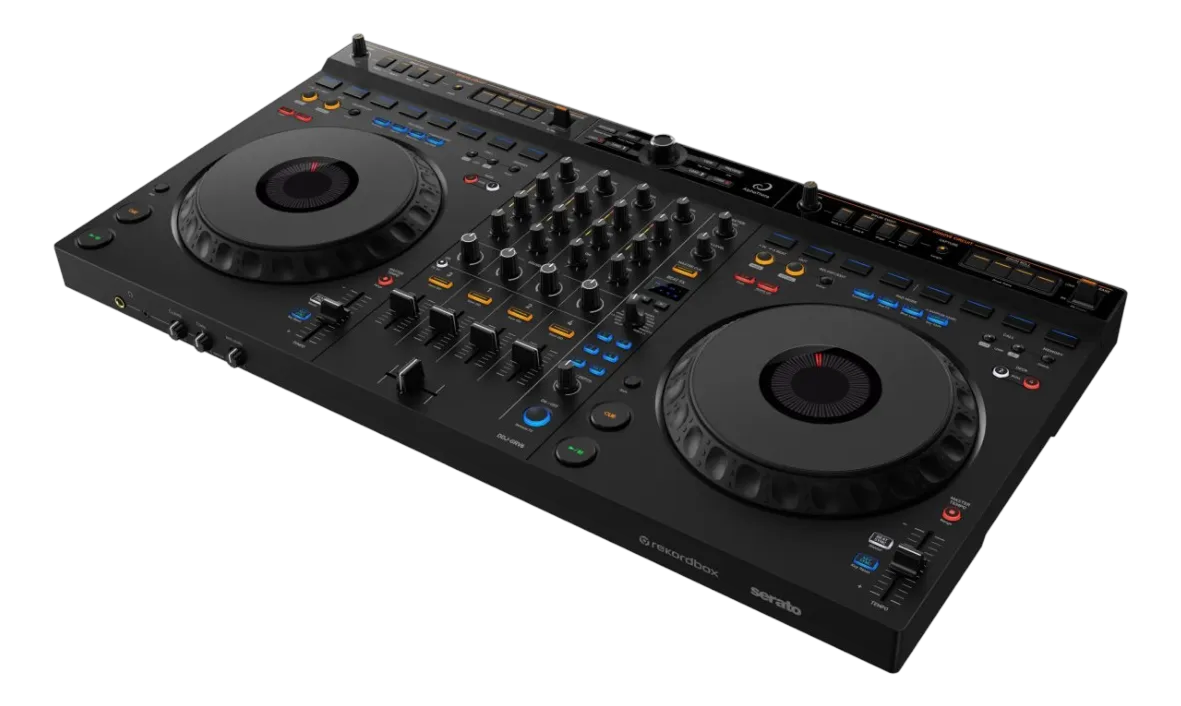
The DDJ-GRV6 is a four-channel controller with a distinct personality: where most controllers are built for mixing two tracks, the GRV6 ('groove') is built for remixing them live. Its standout is deep, dedicated control over Stems — the real-time separation of a track into its vocal, drums and instrument parts — so you can rework songs on the fly, building mashups and grooves that are uniquely yours. It's aimed at creative, performance-minded DJs.
It connects to a laptop and runs rekordbox or Serato, with the Stems and groove features built into the hardware so you're not buried in menus.
The layout has the familiar zones — two jogs with transport and pads, a four-channel mixer with EQ, faders and effects — but with extra controls dedicated to grabbing and manipulating stems and grooves. If your goal is to go beyond clean blends into live, creative reworking of tracks, the GRV6 is built for exactly that. This guide covers the basics and, especially, its groove and Stems superpowers — with the universal skills in our Techniques section underpinning it all.
02
Setup & the basics
Connect the GRV6 to your laptop with one USB cable and open rekordbox or Serato; the controller unlocks and you're ready. Connect headphones and speakers as usual. Prepare your library in your software first — import and analyse your tracks so they have accurate BPM, beat-grids and (importantly for Stems) clean analysis, since live separation works best on well-analysed tracks.
The core playing is like any controller: use the browse knob and load buttons to bring tracks onto the decks, Play and Cue to launch them on the beat, and the jog wheels to scratch (top, vinyl mode) or pitch-bend (edge). The tempo sliders and Beat Sync match two tracks' speeds.
Before diving into the GRV6's creative features, get comfortable with clean fundamentals — beatmatching, the bass swap, launching from cues — because the groove and Stems tricks land best on top of solid mixing, not as a substitute for it. Our Techniques section covers those fundamentals in full. Once they feel natural, the GRV6's real magic opens up.
03
The four-channel mixer
The GRV6's mixer is a four-channel design with the essentials per channel: a trim, three-band EQ, a cue, a fader and effect controls, plus the crossfader. Clean mixing here works exactly as on any mixer — set your levels with the trim, then use the bass swap (cut the incoming track's LOW, layer it in, swap the bass at the transition) for muddy-free blends. Our Gain Staging & EQ Mixing guide covers it fully.
Four channels matter on the GRV6 because they pair so well with its Stems focus: you can run a track on one channel, an isolated vocal or drum stem from another track on a second, and layer them — the foundation of live mashups. The extra channels give your groove-building room to breathe.
Get your two-channel mixing clean and confident first. The GRV6 rewards a DJ who can already blend smoothly by giving them the tools to then take tracks apart and recombine them — but that creative layer sits on top of solid mixing fundamentals, so build those first and the rest becomes play.
04
Live Stems: the GRV6's superpower
This is what the GRV6 is for. Using real-time Stems, it splits any analysed track into parts — broadly the vocal, the drums and the instruments — and gives you dedicated, hands-on control to mute, isolate and blend each one live. Suddenly every track in your library is raw material you can take apart and recombine.
The classic moves: isolate just the vocal from an incoming track and float it over the instrumental you're already playing, for an instant a cappella mashup; or drop a new track's instrumental under the outgoing vocal so the singer carries across the transition; or pull the drums out of an intro so two tracks beatmatch without their kicks fighting, then slam them back for impact. Because the GRV6 has dedicated groove controls, these moves feel immediate and performable rather than fiddly.
The key, as with every powerful feature, is taste: one well-timed vocal-over-instrumental moment lands harder than constantly chopping every stem. Learn one mashup move, make it clean and musical, and the crowd will think you produced the edit yourself. The GRV6 turns DJing into live remixing — used with restraint, that's a genuinely next-level performance.
05
Pads & effects
Beyond Stems, the GRV6 has the performance pads and effects you'd expect. Hot Cue mode saves and launches your favourite moments; Loop mode repeats a section to extend an intro or build tension; and there are pad modes for beat jump and the sampler. Combined with the Stems controls, the pads let you trigger and rearrange parts of a track creatively.
The Beat FX add tempo-synced effects — echo, reverb, filter — locked to the beat, great for accenting transitions; a short echo tail as a track ends is the reliable go-to. The effects pair naturally with the groove features: a reverb wash as you isolate a vocal, an echo as you drop the drums back in.
As always, restraint and timing make these tools shine — the GRV6 gives you a lot of creative power, and the skill is using it deliberately rather than constantly. Our Looping & Hot Cues and Filters & FX guides cover the tasteful use. On the GRV6, the combination of clean mixing, live Stems and well-placed pads and effects is what turns a set into a signature performance.
06
Who the GRV6 is for
The GRV6 is for the creative, performance-minded DJ who wants to do more than blend tracks — who wants to rework them live with Stems and grooves. If your dream is to make every set feel like a live remix, full of unexpected mashups and reworked grooves, this is the controller built for that vision.
Among Pioneer's range, it sits alongside other four-channel controllers but with its groove-and-Stems identity. The DDJ-1000 (in our guides) is the club-trainer, full-size-jog controller; the DDJ-FLX10 is the flagship that also features Stems and four decks; the GRV6 leans hardest into the groove/remix angle with dedicated controls. If live remixing excites you more than perfecting long club blends, the GRV6 speaks your language.
Whichever you choose, the fundamentals are the same and essential — clean mixing, beatmatching, phrasing — and the creative features sit on top. Pair the GRV6 with our Techniques section to build that foundation, then lean into its Stems and groove tools to develop a performance style that's unmistakably yours.