01
What the DDJ-FLX10 is & the layout
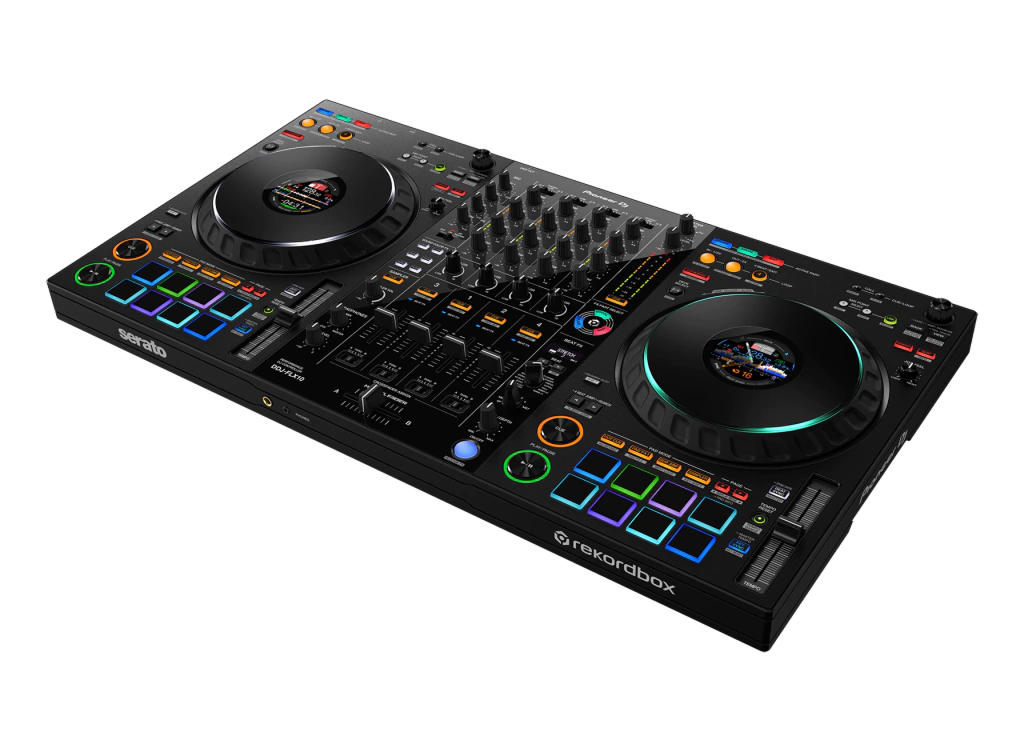
The DDJ-FLX10 is Pioneer DJ's flagship four-channel controller. Unlike a standalone unit it works with a laptop, running either rekordbox or Serato DJ Pro for free, and it's built for performance rather than just mixing two tracks. Two things make it special: it controls four decks, so you can layer tracks, and it does live Track Separation — real-time Stems that split a song into its vocal, drums and instrument parts so you can remix on the spot.
The layout follows the club standard you'll find on CDJs and a DJM mixer, so learning it sets you up for pro gear everywhere. Each side has a full-size jog wheel with a colour screen in the middle (the on-jog display), transport controls, a tempo slider, and eight performance pads. The centre is a four-channel mixer: trim, three-band EQ and a Sound Color FX knob per channel, channel faders, the crossfader, and the Beat FX section. Learn those zones and the rest of this guide is about using them with intent.
02
Set up, browse & the on-jog displays
Setup is plug-and-play: connect the FLX10 to your laptop with one USB cable, open rekordbox or Serato DJ Pro, and the controller unlocks for free. Connect headphones to the front and speakers to the master outputs on the back. Use the browser knob to move through your library and the load buttons to drop a track onto a deck.
The on-jog displays — the colour screens in the centre of each jog wheel — are more useful than they look. They switch between modes: Deck Info shows your BPM, key and time so you never glance at the laptop; Waveform mode shows the track scrolling so you can see a drop coming; Artwork keeps it visual; and there's a logo mode for show. The jog ring around the edge is multicolored and, when you use Track Separation later, it actually shows you which parts of the track are playing. Set the displays to Deck Info or Waveform while you learn — keeping your eyes up, on the gear and the crowd, instead of buried in the screen, is a habit that separates confident DJs from nervous ones.
03
Play, beatmatch & the four decks
Start a track with Play and set your launch point with Cue — pressing Cue during playback snaps you back to it, so you can drop a track in time again and again. The jog wheel bends the pitch when you nudge the outer ring (for small timing fixes) and scratches when you touch the top in vinyl mode.
To beatmatch, get one track playing, start the next in your headphones, and use the tempo slider to match their speeds, then nudge the jog so the beats line up. Beat Sync will do this instantly and it's fine to lean on, but practise it by hand — it's the skill that makes everything else sound deliberate.
The FLX10's four decks open up real creativity. Most of the time you mix on decks 1 and 2, but you can run a vocal a cappella on deck 3 or a percussion loop on deck 4 and layer them over your main mix. Start simple — two decks until blends feel natural — then bring in a third element for a signature moment. Four decks reward preparation, so plan what you'll layer before the gig.
04
Mix it: EQ, Sound Color FX & the bass swap
Two tracks both carrying bass turn to mud, so clean blending comes down to one move: the bass swap. Before you bring a new track in, cut its LOW EQ to zero, raise its channel fader so its highs and mids ride on top of the playing track, and — at the moment of the switch — pull the bass out of the old track while you push it into the new one. The low end hands over cleanly and the join is almost invisible.
Each channel's Sound Color FX knob is your texture control: from the centre, turn one way for a filter that strips the bass (great for building tension), the other way to muffle the highs, or dial in noise and dub echo for character. A slow filter sweep as a track comes in or goes out is one of the most reliable, professional-sounding moves you can make. The crossfader handles the final handover between the left and right decks. Channel faders for level, EQ for clean blending, Sound Color FX for flavour — master that trio and your mixes will sound finished, not fumbled.
05
Track Separation: live remixing with Stems
This is what the FLX10 is famous for. Track Separation uses real-time Stems to split any analysed track into parts — broadly the vocal, the drums, and the instruments — and gives you hands-on control to mute or isolate each one live. Suddenly any two songs in your library can become a mashup.
The classic move is the a cappella swap: as your current track plays, isolate just the vocal from an incoming track and float it over the instrumental you're already playing — instant, original mashup, no special edits needed. Or do the reverse: drop the new track's instrumental under the outgoing vocal so the singer carries across the transition. You can also pull the drums out of an intro so two tracks beatmatch without their kicks fighting, then bring them back for impact.
The multicolored jog ring helps you see what's happening — it lights up to show which parts are playing. The key, as with all power features, is taste: a single well-timed vocal-over-instrumental moment lands harder than constantly chopping every stem. Learn one mashup move, make it clean, and the crowd will think you produced the edit yourself.
06
Pads, Beat FX, Mix Point Link & performing
The performance pads are your creative bank. Hot Cue mode stores favourite moments — a drop, a vocal, an intro — to jump to with a tap; Loop mode repeats a section to stretch an intro or build tension; and there are pad modes for the Stems and beat-jumping too. Set your hot cues before the gig and a track becomes an instrument.
Beat FX add tempo-synced effects — echo, reverb, filter — locked to the beat; pick one, set how many beats it spans, and ride its depth. A short echo as a track ends is a smooth exit from a blend; the rule, always, is restraint. If you're on rekordbox, Mix Point Link lets you pre-set where one track flows into the next so the transition can run hands-free, freeing you to work the Stems or the crowd at the same time.
To perform well: prepare your cues and a tight playlist, keep your gain staging clean so the master never clips, mix in eight-beat phrases so blends land musically, and record your sets to review later. The FLX10 gives you a four-deck, stem-remixing studio — your job is timing, taste and preparation, and this guide has set you up for all three.