01
Why the DDJ-400 is the beginner classic
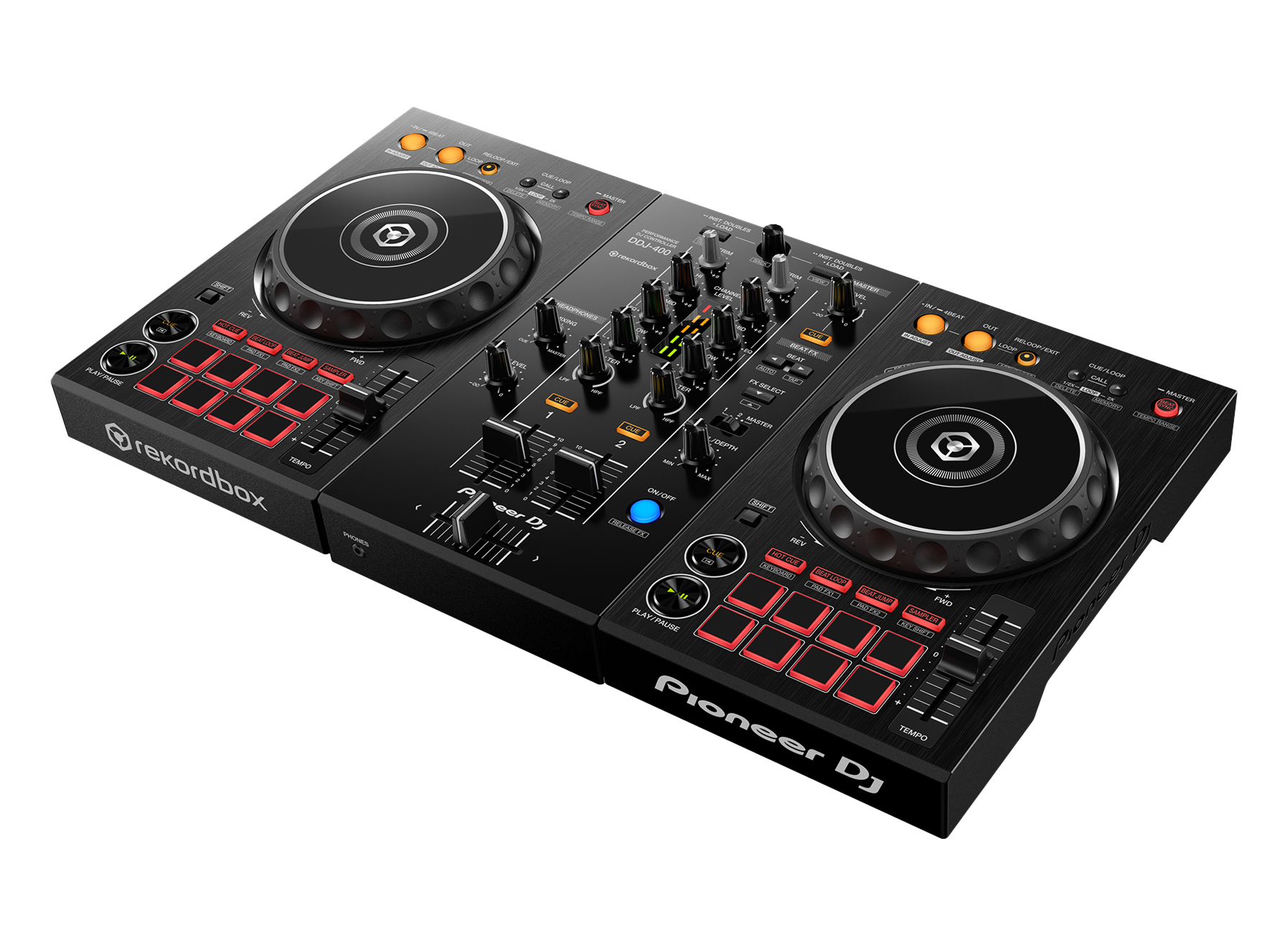
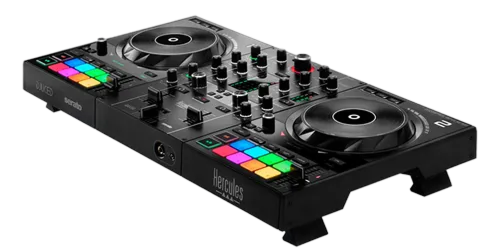
The DDJ-400 is a 2-channel DJ controller built for people learning to mix, and it became a phenomenon — the controller a huge share of today's DJs learned on. Its genius is the layout: it's a smaller, simplified copy of a professional setup of two CDJ players and a DJM mixer. So while it's easy enough for a complete beginner, every control sits where it would on club gear, meaning the muscle memory you build at home transfers directly to a festival or club booth.
It's bus-powered — one USB cable to your laptop both powers it and carries the audio — and it runs on rekordbox, Pioneer's free DJ software (a licence comes with the unit). Plug in your headphones and speakers and you're ready.
The map is simple: a deck on each side (jog wheel, play, cue, tempo and eight pads) and a 2-channel mixer in the middle (EQ, faders, crossfader and a Beat FX section). That's it. The rest of this guide takes you through using each part to play your first real mix — and because we cover the universal skills in depth in our Techniques section, here we focus on the unit itself.
02
Set up rekordbox & load a track
Setup is quick. Download rekordbox (it's free), create an account, and import your music into it — let it analyse your tracks so it knows their BPM and beat-grids, which makes everything else work. Connect the DDJ-400 to your laptop with the single USB cable; rekordbox detects it and switches to Performance mode, and the controller comes alive. Plug headphones into the front and your speakers into the master output on the back.
In rekordbox you'll see your library. Use the browse knob on the controller to scroll through your tracks and the LOAD buttons to drop one onto a deck. Press play and you'll hear it through your speakers, with the waveform scrolling on screen.
Before you mix, take two minutes to prepare: it's worth analysing all your tracks and even setting a few cue points in advance (we cover hot cues later). A well-organised rekordbox library is the foundation of smooth DJing on any Pioneer gear. With music loaded and playing, you're ready to learn the controls — starting with the deck and the jog wheel.
03
The deck: jog, play, cue & tempo
Each side of the DDJ-400 is a deck. Play/Pause starts and stops the track. The jog wheel does two jobs: nudge its outer edge while the track plays to gently speed it up or slow it down (pitch bend, for small timing fixes), or touch the top with vinyl mode on to scratch. While paused, turning the jog scrubs slowly through the track so you can find an exact spot.
That spot is your cue point. Pause the track, jog to the first beat, and press CUE to set it. Now during playback, pressing CUE jumps you straight back there and pauses — so you can launch the track precisely on time, again and again. This 'set a cue, launch on the beat' habit is the start of every clean mix.
The TEMPO slider changes the track's speed, and you use it to match two tracks' BPMs so they can play together. The DDJ-400 even has a Beat Sync button that matches them instantly. We teach the full skill of matching tempo and lining up beats by ear in our How to Beatmatch guide — the DDJ-400 is the perfect unit to practise it on, because it's laid out exactly like the club gear you'll graduate to.
04
The mixer & your first blend
The middle of the DDJ-400 is a 2-channel mixer, and it's where the actual mixing happens. Each channel has a trim (gain) knob at the top, three EQ knobs (HIGH, MID, LOW), a headphone cue button, and a channel fader. The crossfader at the bottom slides the sound between the left and right decks.
Your first blend uses the classic 'bass swap'. With both tracks beatmatched, cut the incoming track's LOW EQ all the way down, then raise its channel fader — you'll hear its highs and mids layer over the playing track with no muddy clash, because only one bassline is sounding. Let them ride together for a few bars, then make the switch: drop the LOW on the old track and bring the LOW up on the new one at the same time, so the bass hands over cleanly. Finally fade the old track out.
That's a real transition, and it sounds professional. Set your levels with the trim first so both tracks are equally loud (clean gain staging), then blend with the EQ and faders. We go deep on levels and EQ in our Gain Staging & EQ Mixing guide — but on the DDJ-400, that bass-swap move is the single most important thing to drill.
05
Pads & Beat FX
The eight performance pads under each deck are where DJing gets fun. They change function with the pad mode buttons. Hot Cue mode lets you save favourite moments — a drop, a vocal, an intro — and jump to any of them with a tap, so you can rearrange a track live or relaunch it instantly. Beat Loop mode captures a perfectly-timed loop to extend an intro or build tension. There are also pad modes for beat jump and the sampler.
The Beat FX section adds tempo-synced effects — echo, reverb, filter and more — locked to the beat. On the DDJ-400 you choose the effect and its beat length, then bring it in: a short echo as a track ends is a smooth, professional way out of a blend.
The golden rule with both pads and effects is restraint: one well-placed hot cue or a single echo tail does more than constant button-mashing. We cover the creative use of these tools in depth in our Looping & Hot Cues and Filters & FX guides. On the DDJ-400, start by just setting and launching hot cues cleanly — it's the most useful pad skill and the foundation for everything else.
06
From bedroom to booth
The reason the DDJ-400 is such a beloved starting point is that nothing you learn on it is wasted. Because its layout copies a professional CDJ-and-DJM setup — the jog wheels, the cue and play buttons, the EQ and crossfader, the Beat FX — the moment you step up to club gear or a bigger controller, your hands already know where everything is. You're not relearning; you're just scaling up.
So treat it as a serious instrument. Build the core habits properly: clean gain staging, beatmatching by ear (not just Sync), the bass-swap blend, and tasteful use of cues and effects. Those fundamentals are the same on a DDJ-400 in your bedroom and a CDJ-3000 in a festival booth — the gear changes, the skills don't.
When you're ready to grow, the natural next steps are a 4-channel controller like the DDJ-FLX10, a standalone unit like an XDJ, or learning on real CDJs and a DJM mixer. But there's no rush: countless professional DJs played their first gigs on a DDJ-400, and you can learn every fundamental of mixing on it. Pair it with our Techniques guides, practise a little most days, and this humble controller will take you a very long way.