01
The multiplayer that set the standard
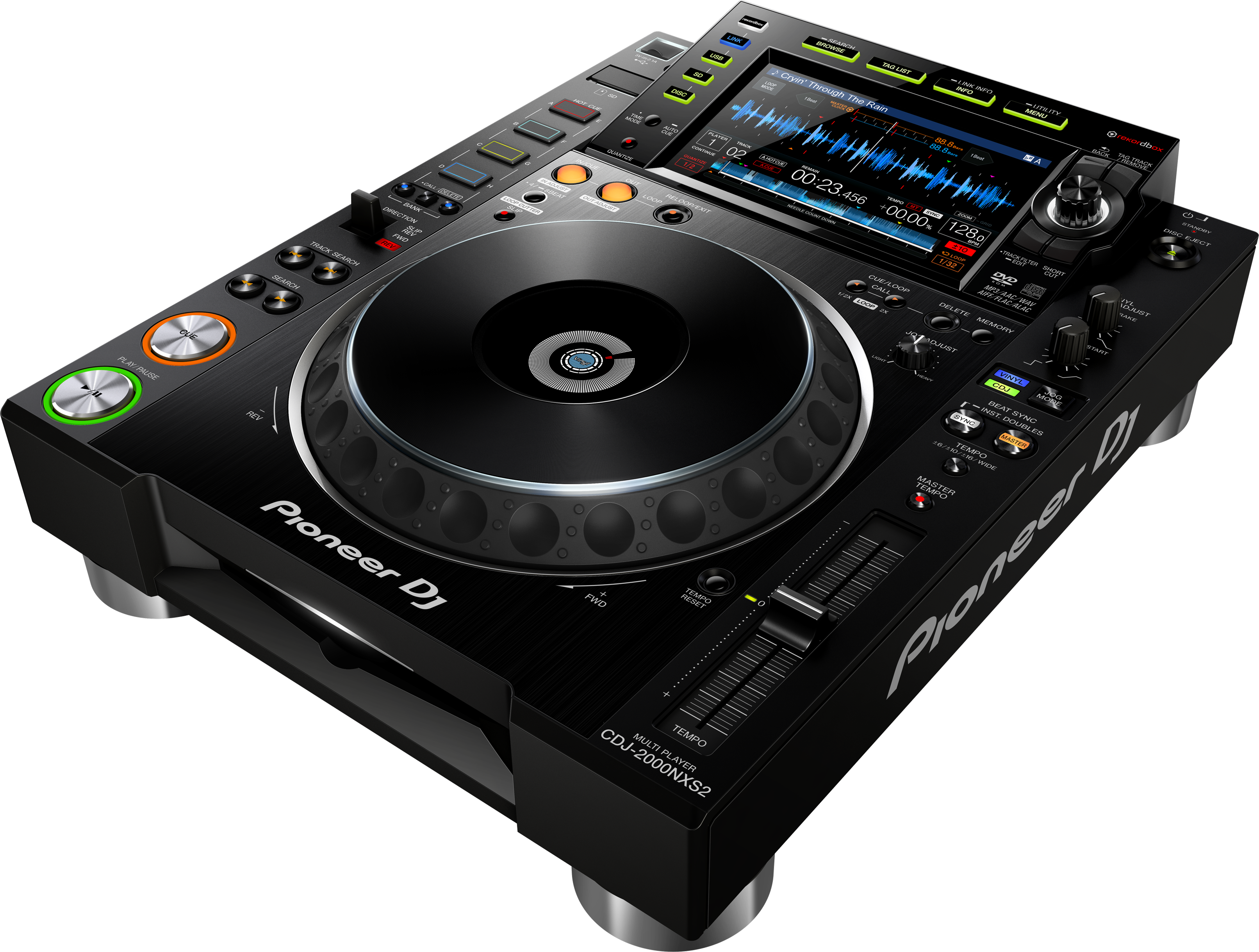
A CDJ is a professional 'multiplayer' — a single deck that plays one track. You use two of them (or more), side by side, feeding a separate DJ mixer, and the pair is the setup you'll find built into virtually every professional club and festival booth. The CDJ-2000NXS2 was the club standard for years before the CDJ-3000 arrived, and because gear is expensive to replace, it remains installed in a huge number of venues today. Learning it isn't nostalgia — it's job-readiness.
The NXS2 plays from a USB stick or SD card prepared in rekordbox, or directly from a laptop running rekordbox over a network (Pro DJ Link). It has a bright full-colour touchscreen for browsing and waveforms, a large jog wheel, and all the performance tools — hot cues, loops, beat jump, sync, slip and quantize.
Unlike a controller, a CDJ doesn't run the software itself in the same way — it reads your prepared library and you perform on the hardware. The rest of this guide covers exactly how, so that when you're handed a pair of CDJ-2000NXS2s in a booth, you can step up and play without hesitation.
02
Loading music: USB, SD & Pro DJ Link
Everything starts with rekordbox. On your computer, import and analyse your music, set cues and loops, then export it to a USB stick or SD card. That prepared drive is what you bring to the gig: plug it into the CDJ and all your tracks, with their cues, loops and waveforms, are instantly available. This is the standard, reliable club workflow — most pros walk in with a USB stick (and a backup).
There are two other ways in. Pro DJ Link lets you connect several CDJs and a laptop together with a LAN cable, so one USB stick can feed every player in the booth, and the players share information like the master tempo. And you can play straight from rekordbox on a connected laptop over that same link.
On the deck, use the rotary selector and the touchscreen to browse your folders, playlists and tracks — you can search and filter to find the right one fast — then press LOAD to bring it onto the player. A key habit: always carry your music on at least two drives, because a corrupted USB stick mid-gig is the classic DJ nightmare. With your library loaded, you're ready to play.
03
Playing: the jog, screen & searching
The basics: PLAY/PAUSE starts and stops, and CUE sets a temporary launch point that you can always jump back to (press CUE while playing to return there and pause). The big jog wheel works in two modes — with Vinyl on, touching the top scratches and stops the track like a record; with it off, the platter nudges the pitch for fine timing adjustments. You set the feel and the start/stop braking to taste.
The full-colour touchscreen is central to the NXS2. It shows the waveform of your track so you can see a drop or breakdown coming, your cue and loop markers, and all your browsing. You can touch the waveform to jump around, and Needle Search (a strip below the screen) lets you drag to any point in the track instantly — invaluable for finding the exact spot you want.
Track Search skips between tracks, and the search/filter tools help you find your next selection without breaking your flow. The skill of matching two tracks' tempo and beats by ear is universal — we teach it fully in our How to Beatmatch guide — and the CDJ-2000NXS2 is the real-world instrument that skill was made for.
04
Hot cues, loops & beat jump
The CDJ-2000NXS2's performance pads and controls turn a track into something you play. Hot Cues let you save up to eight points in a track and launch from any of them instantly — set them on the drop, the vocal, the intro, and you can rearrange a song live, jump straight to its best part, or rescue yourself if you started in the wrong place. You can save these cues to your USB so they're ready every time.
Looping repeats a section: drop an auto loop of a set number of beats to hold a groove while you mix the next track in, or set Loop In and Loop Out manually for a custom section, then halve or double its length. Beat Jump moves you forward or back by an exact number of beats, perfect for quick rearranging or lining up with the other deck.
These tools all rely on Quantize and Slip (next lesson) to stay clean. We cover the creative side of cues and loops in depth in our Looping & Hot Cues guide; here the key point is that on a CDJ you prepare these in rekordbox beforehand and recall them live, so a little prep makes you look effortless in the booth.
05
Beat Sync, Quantize & Slip
Three features keep your playing locked and clean. Beat Sync matches this deck's tempo and beat-grid to another linked CDJ at the press of a button — handy for holding a mix steady while you work effects or browse, though learning to beatmatch by ear (see our When to Use Sync guide for the honest take) is still essential for real control.
Quantize is the unsung hero: with it on, your hot cues and loops automatically snap to the beat-grid, so even if your finger is slightly early or late, the cue or loop lands perfectly in time. It makes performing with cues and loops far more forgiving and is usually worth leaving on while you learn.
Slip mode is the safety net: with Slip on, you can jump to a cue, trigger a loop or scratch, and the track keeps playing silently underneath — so when you stop, it resumes exactly where it would have been, as if you never left. That lets you take creative risks (a quick loop roll, a cue juggle) without derailing the track. Together, Quantize and Slip let you perform boldly while staying perfectly in time — the mark of a confident CDJ player.
06
CDJ-2000NXS2 vs CDJ-3000 & club readiness
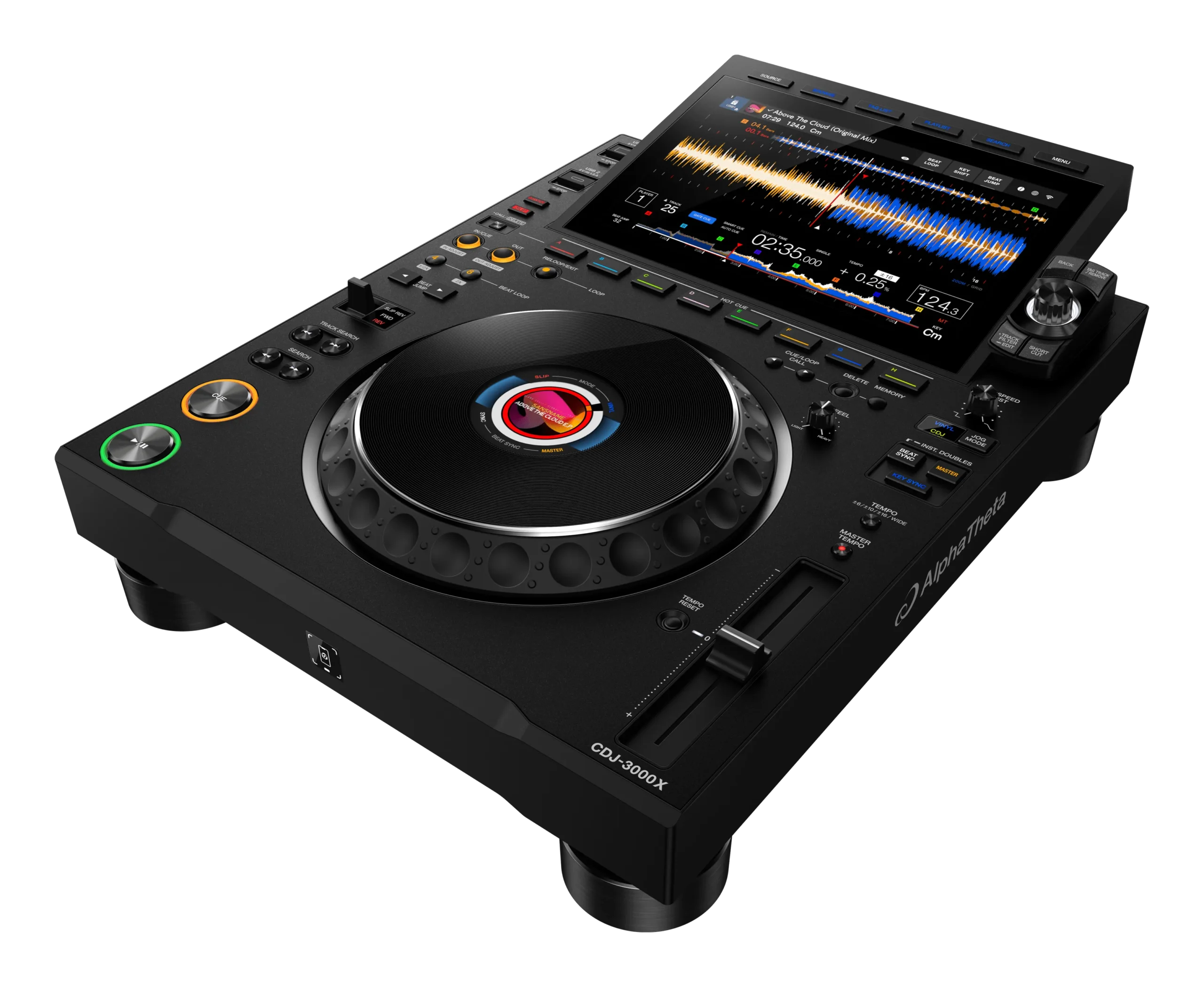
The CDJ-3000 (and 3000X) is the newer flagship, and it's worth knowing the differences so you're comfortable on either. The CDJ-3000 has a bigger, sharper touchscreen, more hot-cue buttons (eight dedicated pads), faster browsing, more onboard effects, and newer features like cloud and streaming play. But the core workflow is the same: prepare in rekordbox, load from USB or over Pro DJ Link, cue, beatmatch, use hot cues and loops. If you can play a CDJ-2000NXS2, you can sit down at a CDJ-3000 and play immediately — the layout and logic carry across.
That's exactly why the NXS2 is worth learning even though it's the older model: it's still in countless booths, and it teaches the universal CDJ skills. A DJ who only knows controllers can be thrown by a club's CDJ-and-DJM setup; a DJ comfortable on CDJs can play anywhere.
Pair this guide with our Techniques section for the universal skills — beatmatching, EQ mixing, phrasing — and you'll have everything you need to walk into a professional booth, plug in your USB, and perform with confidence. That readiness is what turns a bedroom DJ into a gigging one.