01
What VirtualDJ is & the versions
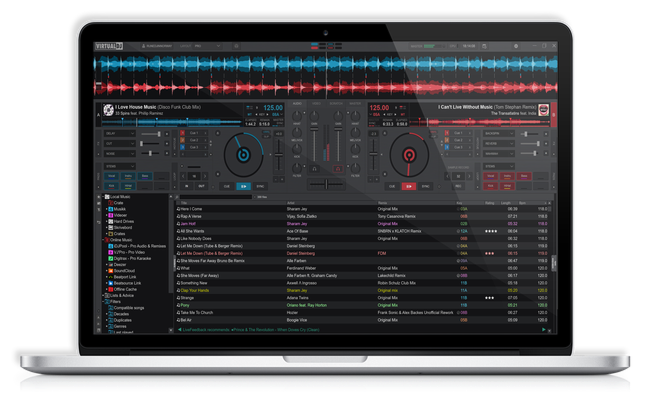
VirtualDJ, made by Atomix Productions, is one of the most-used DJ applications on the planet, with a particularly big following among mobile, wedding, bedroom and party DJs. It runs on Windows and Mac (plus mobile apps), has a friendly, approachable interface, and is known for being feature-packed and flexible.
Its licensing is unusual and worth understanding. VirtualDJ is free for home/personal use with most features — you can download it and mix with your laptop's keyboard or a controller at no cost, which is a big reason beginners flock to it. Using it professionally (for paid gigs) requires a paid licence (a subscription or a one-off pro licence), and some advanced features may sit behind that. For learning at home, though, the free version does a great deal.
It works with an enormous range of controllers from many brands, so whatever hardware you have, there's a good chance VirtualDJ supports it. This guide covers building your library, the performance workflow, its standout stem and video features, and connecting hardware — with the universal DJ skills in our Techniques section underpinning all of it.
02
Your library & streaming
VirtualDJ works from your music library — import your files and it builds a browser you organise into folders and playlists, analysing each track for BPM, key and waveform so the mixing features work. As always, analyse your music before a gig so nothing is unprepared.
A big draw is its broad streaming integration: VirtualDJ connects to many streaming services so you can search and mix from enormous catalogues without owning the files — extremely handy for mobile and party DJs who get unexpected requests. The usual caveat applies: streaming depends on a stable connection, so for important gigs keep your essential tracks downloaded and owned, and treat streaming as a flexible supplement (see our Finding & Buying Music guide).
The interface makes browsing and loading quick, with clear waveforms and the track info you need, plus smart suggestions to help find a compatible next track. VirtualDJ's combination of your own library plus wide streaming access gives it huge range — particularly valuable for the all-genres, take-any-request style of mobile and event DJing it's so popular for.
03
Cues, loops & the workflow
VirtualDJ gives you the full performance toolkit. Set hot cues on the key moments of a track — the first beat, the drop, a vocal — and they save with the track and map to your controller's pads, ready to launch instantly. Loops (auto and manual) let you repeat a section to extend an intro or build tension. There are also tools for beat jump, sampler and more.
The workflow is built around clear waveforms and a customisable interface — VirtualDJ is highly configurable, so you can lay it out to suit you (which is powerful, though beginners should start with the default layout). Sync and quantize are available to keep things locked while you learn, though beatmatching by ear remains the skill worth building (see our When to Use Sync guide).
The universal skills — beatmatching, EQ mixing, phrasing, tasteful effects — are the same in VirtualDJ as on any gear, and our Techniques section covers them in full. VirtualDJ simply gives you a flexible, feature-rich environment to perform them in, with the cue-and-loop tools that let you go from blending tracks to really performing them.
04
Stems & live remixing
VirtualDJ was an early pioneer of real-time stem separation, and it's one of its standout features. The software can split any track into parts — vocals, instruments and drums — live, and give you control to isolate, mute or blend each one. That turns every track in your library into raw material for remixing on the fly.
The creative moves are the classics: isolate a vocal from one track and float it over the instrumental of another for an instant a cappella mashup; drop a new track's instrumental under an outgoing vocal so the singer carries across; or pull the drums out so two tracks beatmatch without their kicks clashing, then bring them back for impact. VirtualDJ also uses stems for smart features — like cleaner transitions that separate and recombine elements automatically.
As with every powerful tool, taste is everything: one well-timed vocal-over-instrumental moment lands harder than constantly chopping stems (our Filters & FX and Looping & Hot Cues guides cover the principles). VirtualDJ makes this live-remixing power accessible to anyone, even on the free version with modest hardware — used with restraint, it's a genuine performance superpower.
05
Video mixing & extras
A feature that sets VirtualDJ apart from most DJ software is video mixing (VJing). It can mix music videos and visuals just as it mixes audio, with transitions, effects and overlays — so you can be a VJ at an event, throwing visuals on a screen in sync with your music. For mobile and event DJs, this is a real selling point and a way to offer more to clients.
It also has strong karaoke support (a staple of mobile and bar gigs), a sampler, a wide range of audio effects, and extensive customisation — you can tailor the interface, map controllers freely, and add community-made extensions. This depth is why VirtualDJ is such a workhorse for working mobile DJs who need one app to do everything: audio, video, karaoke and requests.
These extras are optional — you can ignore them entirely and just mix music — but knowing they're there is part of understanding why VirtualDJ is so popular for all-in-one event work. If your path is mobile, wedding or bar DJing, VirtualDJ's video and karaoke features alone can make it the right choice.
06
Hardware & habits
While you can mix in VirtualDJ with just your laptop's keyboard or a touchscreen to learn, connecting a hardware controller transforms it into a proper instrument. VirtualDJ supports a huge range of controllers from nearly every brand — often more than any other software — so whatever gear you have or buy, it's likely supported, and the software maps the decks, mixer and effects to your hardware.
A few habits keep your sets solid. Analyse your library before gigs so BPM, grids and waveforms are ready. Manage streaming carefully — download essentials for offline use and never rely solely on a live connection in a venue. Keep your laptop performance-ready (close other apps, disable sleep and notifications, keep VirtualDJ updated). And if you use the free version, remember a paid licence is needed for professional/paid gigs.
Most importantly, remember the software is only half the equation: the fundamentals — beatmatching, gain and EQ, phrasing, reading the room — are what make you a good DJ, and they're the same in VirtualDJ as anywhere. Use our Techniques section to build them, and let VirtualDJ be the flexible, do-everything environment you perform them in. Its breadth and accessibility make it one of the most capable all-round DJ apps available.