01
What rekordbox is & its two modes
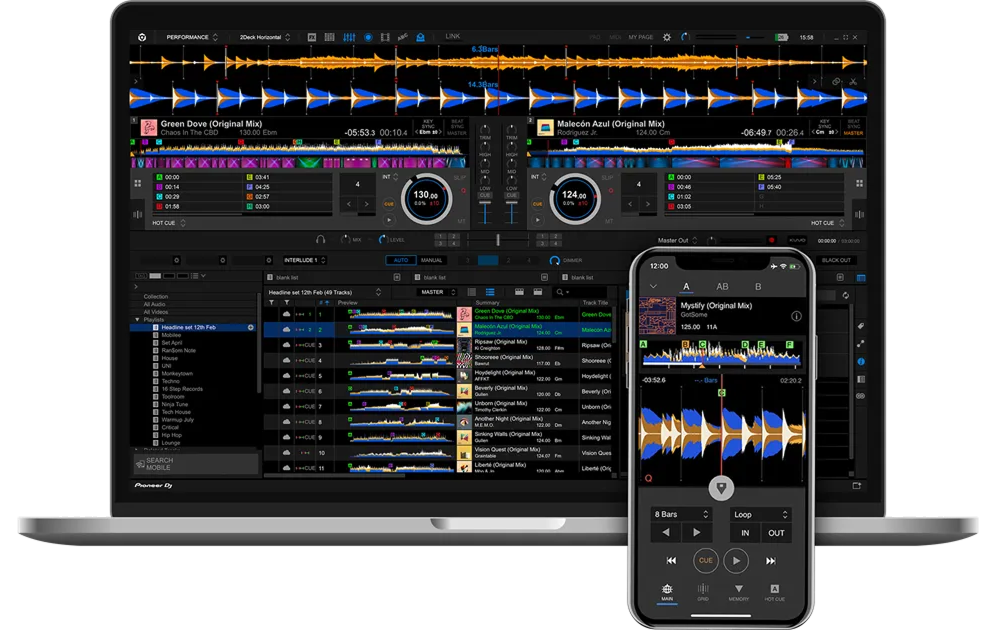
rekordbox is the free software that powers the Pioneer DJ ecosystem, and understanding its two sides is the key to it. The first is library management and Export: you import your music, the software analyses it, you organise it into playlists and set your cues and loops, and then you export it to a USB stick or SD card to play on CDJs. The second is Performance mode: rekordbox can also be the DJ application itself, so you mix directly in the software using a controller or your laptop.
This matters because even if you never DJ on your computer, you still use rekordbox: it's how you prepare the USB stick that you plug into club CDJs. Your cues, loops, beat-grids and playlists all live in rekordbox and travel with your music. So it's not just an app for controller DJs — it's the prep tool the whole Pioneer world depends on.
The core version is free, with paid tiers unlocking extra features (like advanced performance tools, cloud and streaming). For most DJs, the free version does everything you need to organise your library and prepare for gigs. This guide walks through building that library and using both modes.
02
Building & analysing your library
Everything in rekordbox starts with your collection. Import your music files and rekordbox adds them to its library. The crucial step is analysis: rekordbox scans each track to detect its BPM (tempo), build a beat-grid (a map of where every beat falls), and detect its musical key. This analysis is what makes everything else work — beat sync, key mixing, the waveform displays, quantized cues — so always let your tracks analyse fully before a gig.
Then organise. Build playlists by purpose: warm-up tracks, peak-time tracks, by genre, by energy — whatever helps you find the right track fast in the moment. You can also use 'My Tag' and other tools to label tracks by mood or situation, and rekordbox can sort and filter by BPM, key and rating so compatible tracks are easy to find. A well-organised library is one of the biggest, least glamorous advantages a DJ can have — it's the difference between confidently reaching for the perfect track and panicking through a messy collection mid-set.
Spend time here. The work you do organising and analysing at home is what lets you perform smoothly and improvise confidently when you're playing out.
03
Cues, loops & fixing the grid
rekordbox lets you set your performance markers in advance so they're ready to recall on any gear. Set hot cues on the key moments of a track — the intro's first beat, the drop, a vocal — and they save with the track, so when you load it on a CDJ or controller later, those cues are waiting on the pads. Setting cues at home means you're never fumbling live. You can also save loops the same way.
The most important prep job is checking the beat-grid. rekordbox's automatic analysis is usually accurate, but on some tracks — older songs, live drums, tracks with tempo changes — the grid can be slightly off, which throws off sync, quantize and looping. Learn to spot a wrong grid (the beat markers don't line up with the kicks) and fix it: rekordbox has grid-editing tools to nudge, set, or correct the downbeat and tempo. A correctly gridded library makes everything downstream — on the software or on CDJs — work flawlessly.
This prep is invisible to the crowd but felt in every smooth transition. Cues set, loops saved, grids checked: that's a track that's truly gig-ready, and doing it in rekordbox means it's ready everywhere you play.
04
Export mode: prepping a USB for CDJs
This is the workflow that makes rekordbox essential even for DJs who never touch a controller: preparing a USB stick to play on club CDJs. In Export mode, you connect a USB stick (or SD card) and copy your chosen playlists and tracks onto it in rekordbox's format. Everything you prepared — analysis, hot cues, loops, beat-grids, playlists — is written to the stick alongside the music.
Then at the gig, you simply plug that stick into a CDJ-2000NXS2, a CDJ-3000, or an XDJ, and your entire prepared library appears, with all your cues and waveforms intact, ready to perform. No laptop required. This is how the vast majority of professional DJs play: prep at home in rekordbox, walk into the booth with a USB stick (and a backup — always carry two), and plug in.
A few habits make this bulletproof: export to two separate drives so a corrupted stick never ends your set, eject the drive properly in rekordbox before removing it (to avoid corruption), and double-check your key playlists are on the stick before you leave. Master this export workflow and you can walk into any Pioneer-equipped booth in the world and play your fully-prepared set from a stick in your pocket.
05
Performance mode: DJing in rekordbox
rekordbox's other half is Performance mode, where the software becomes the DJ application itself. Connect a compatible controller (like a DDJ-FLX4 or DDJ-FLX10) and rekordbox unlocks its performance features for free, showing decks, waveforms, a mixer and effects on screen while you control them with the hardware. You can also mix using just your laptop's trackpad to learn, though hardware is far better.
In Performance mode you get the full toolkit: dual or four decks, the waveforms and your saved cues and loops, beat sync, quantize, key sync, a sampler, and a range of effects. Higher tiers and supported hardware add advanced features like live Stems (track separation) and Mix Point Link. Because your library, cues and grids are the same ones you prepared, everything you organised carries straight into your performance.
Whether you perform in rekordbox on a controller or export to CDJs, the prep is identical — which is the beauty of the ecosystem. Learn the universal skills in our Techniques section (beatmatching, EQ, phrasing, effects), and rekordbox becomes the consistent home base for your music whether you're practising on a controller or headlining on club CDJs.
06
Tips & habits for rekordbox DJs
A few habits separate organised rekordbox DJs from chaotic ones. First, analyse and grid everything before you need it — never show up to a gig with un-analysed tracks, because un-gridded music breaks sync and quantize. Second, back up your library: rekordbox stores your playlists, cues and grids in a database on your computer, and losing it means losing years of prep, so back it up regularly. Third, always export to two USB drives, and eject them properly, so a single corrupted stick can't end your night.
Keep your library tidy as it grows: prune duplicates, fix any tracks that won't analyse correctly, and keep your playlists meaningful rather than letting one giant unsorted folder build up. A little maintenance keeps the whole system fast and reliable.
Finally, prepare with performance in mind: set hot cues on the spots you'll actually use, organise playlists the way you think during a set, and tag tracks so you can find the right energy fast. rekordbox rewards preparation more than almost any other tool in DJing — the time you put into a clean, well-cued, well-organised library comes back to you as confidence and smoothness every single time you play.