01
What djay Pro is
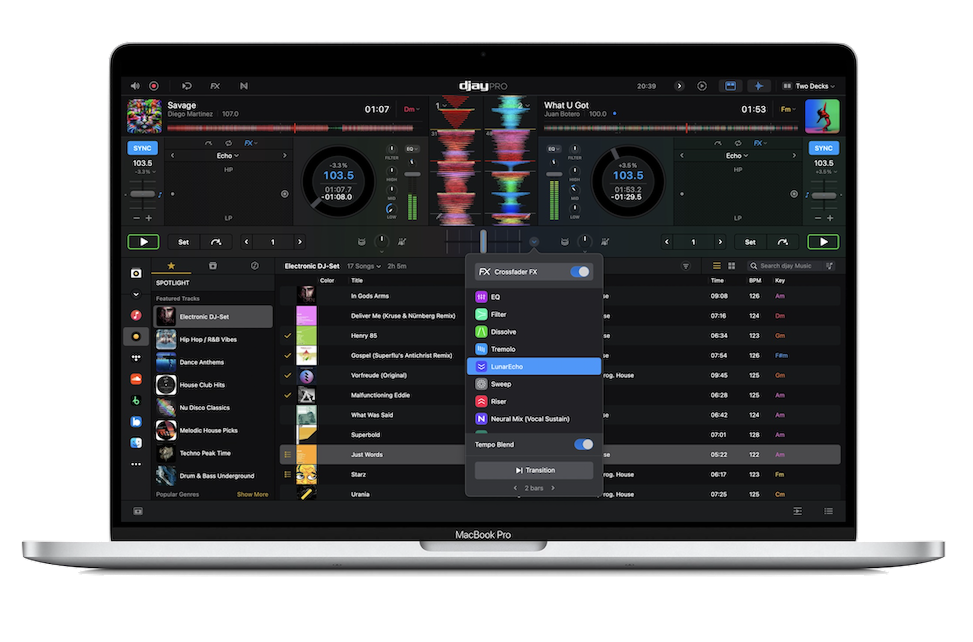
djay Pro, made by Algoriddim, is one of the most popular and versatile DJ applications in the world, and its biggest strength is flexibility: it runs across Mac, iPad, iPhone and Windows, so you can mix on a laptop, a tablet or even your phone, with your library and settings following you. That cross-platform reach, a famously slick and approachable interface, and an affordable price make it a favourite for everyone from total beginners to working pros.
Two features set it apart. First, deep streaming integration — djay Pro works directly with streaming services, most notably Apple Music, giving you access to a vast catalogue of tracks to mix (within the service's terms). Second, Neural Mix — Algoriddim's pioneering AI that separates tracks into stems (vocals, drums, instruments) in real time for live remixing, which they brought to DJ software early.
You can mix with just a trackpad or touchscreen to learn, or connect a controller for a hands-on experience. This guide covers using your music and streaming, the Neural Mix superpower, hardware and Automix, and habits for reliable sets.
02
Your library & streaming
djay Pro works with your local music files — import them and it builds a library you organise into playlists, analysing each track for BPM, key and waveform so mixing features work. But its headline is streaming: djay Pro integrates directly with services including Apple Music, so you can search and mix from an enormous catalogue without owning the files, plus other supported sources. (Streaming for DJing depends on the service's terms and usually needs a stable internet connection, so for important gigs, downloaded or local tracks are the safer bet.)
The interface makes browsing and loading quick, with clear waveforms and the track info you need. You can build playlists for different moods and events just as in any DJ software, and djay Pro offers smart suggestions to help you find a compatible next track.
Good selection is the heart of DJing, and djay Pro's combination of your own library plus huge streaming catalogues gives you enormous range — especially valuable for mobile and party DJs who get unexpected requests. Just remember the golden rule of streaming: have a backup plan (and ideally local copies of your essentials) in case the connection drops.
03
Neural Mix: live AI remixing
Neural Mix is djay Pro's signature feature and a genuinely powerful one. Using AI, it separates any track into its components — vocals, drums (beats), and instruments (harmonics) — in real time, and gives you faders and controls to isolate, mute or blend each part live. It turns every track into raw material for remixing on the fly, and Algoriddim were pioneers in bringing this to DJ software.
The creative moves are the same as on hardware with Stems: isolate a vocal from one track and float it over the instrumental of another for an instant a cappella mashup; drop a new track's instrumental under an outgoing vocal so the singer carries across; or pull the drums out so two tracks beatmatch without their kicks clashing, then bring them back for impact. Neural Mix also enables creative EQ-like control — fading out just the vocals or just the beats — that goes beyond a normal three-band EQ.
As with every powerful tool, taste is everything: one well-timed vocal-over-instrumental moment lands harder than constantly chopping stems. Our Filters & FX and Looping & Hot Cues guides cover the creative principles. Neural Mix makes live remixing accessible to anyone running djay Pro — used with restraint, it's a real performance superpower.
04
Hardware & Automix
While you can mix in djay Pro with just a trackpad or touchscreen — great for learning and for casual use — connecting a hardware controller transforms it into a proper hands-on instrument. djay Pro supports a wide range of controllers from many brands, mapping the decks, mixer and effects to physical jogs, faders and pads, so you get the tactile control real mixing needs. If you're serious about performing, a controller (even a small one) is well worth it.
At the other end of the spectrum, djay Pro has a strong Automix feature: it can automatically beatmatch and blend tracks from a playlist for you, with various transition styles. This is genuinely useful for background music at events, parties where you can't be at the decks the whole time, or just enjoying continuous music — and it's a gentle way for beginners to hear how transitions work. It's not a substitute for learning to DJ, but it's a handy tool to have.
So djay Pro flexes from fully hands-off Automix to deep hands-on control with a controller and Neural Mix. Pick the level that fits the moment — and as you grow, lean toward hands-on performance and the fundamentals in our Techniques section, which make you a real DJ rather than a playlist-player.
05
Tips & habits for djay Pro
A few habits make djay Pro shine. First, prepare and analyse your music before gigs so BPM, grids and waveforms are ready — and, crucially, manage streaming carefully: streamed tracks depend on a stable connection, so for any important set, download your key tracks for offline use or keep local copies, and never rely solely on a live stream in a venue with shaky Wi-Fi. A dropped connection mid-set is the one big risk of streaming-based DJing.
Second, keep your device performance-ready: close other apps, enable a do-not-disturb mode, and keep djay Pro updated — whether you're on a Mac, iPad, iPhone or PC, a clean device is a reliable one. If you're performing on an iPad or iPhone, make sure it's charged and won't be interrupted by calls or notifications.
Third, remember the software is only half the equation: the fundamentals — beatmatching, gain and EQ, phrasing, reading the room — are what make you a good DJ, and they're the same in djay Pro as anywhere. Use our Techniques section to build them, and let djay Pro be the flexible, powerful, go-anywhere environment you perform them in. Its versatility across devices and its Neural Mix make it one of the most capable and accessible DJ apps you can choose.