01
What Traktor Pro is
Traktor Pro, made by Native Instruments, is a long-established and highly respected DJ application, particularly popular in the electronic music world — techno, tech-house, house and beyond. It's known for being deep and powerful, with a feature set aimed at creative, hands-on performance rather than just blending tracks. Many electronic DJs swear by it.
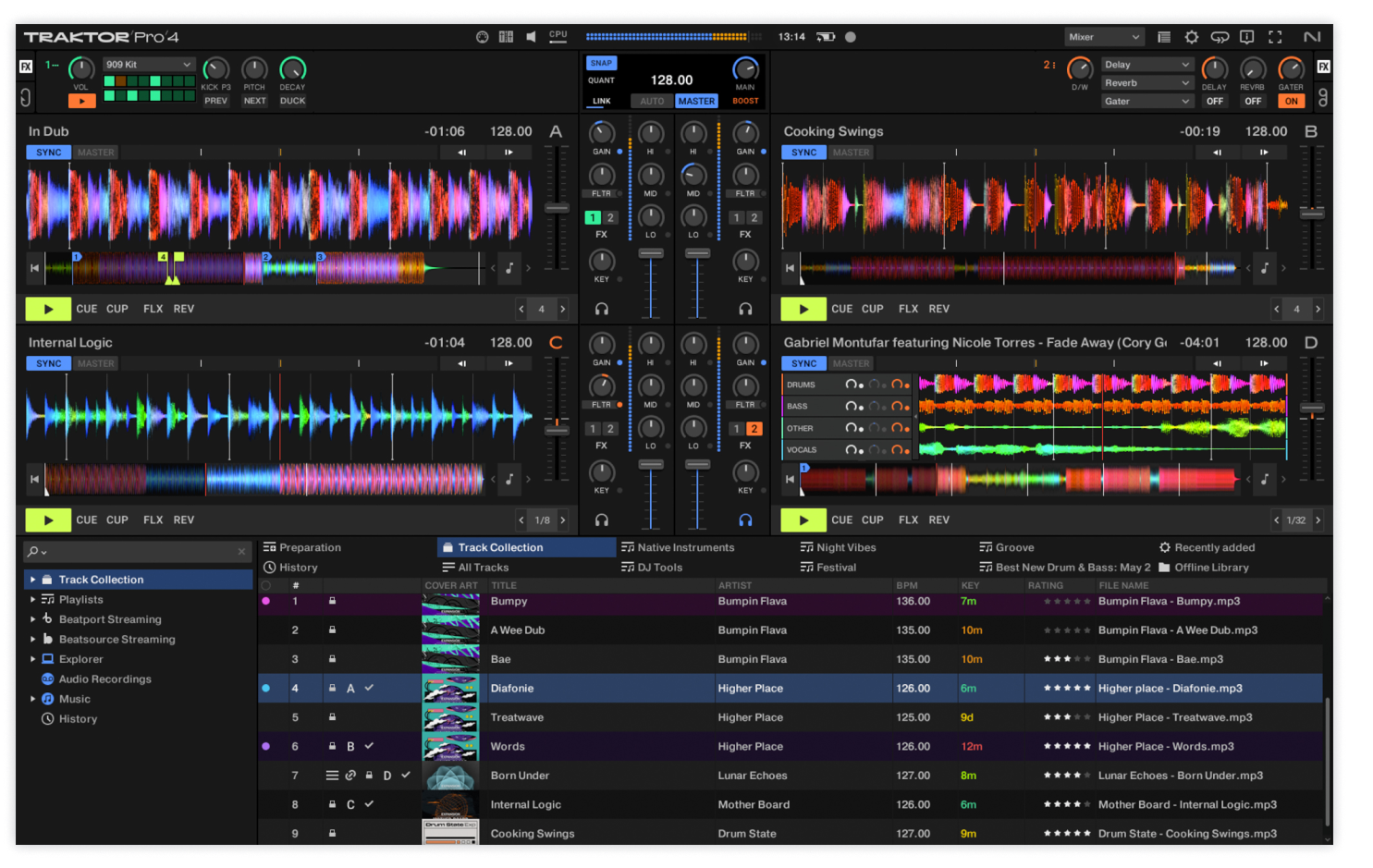
It runs on Windows and Mac, supports up to four decks, and has a famously strong effects engine, the creative Remix Decks (for triggering loops and samples), a loop recorder for building layers live, and Stems — Native Instruments actually pioneered the Stems concept that's now everywhere. It pairs especially well with NI's own Traktor Kontrol controllers, but works with many other controllers and supports DVS for timecode turntables.
Traktor has a slightly steeper learning curve than some beginner-friendly apps, reflecting its depth, but it rewards DJs who want serious creative control. This guide covers organising your library, the performance workflow, and Traktor's standout creative tools — with the universal DJ skills in our Techniques section underpinning it all.
02
Your library & analysis
Traktor works from your music collection — import your files and it builds a browser you organise into playlists, analysing each track for BPM, key and waveform. Analysis is essential (it powers sync, the grids, key mixing and the waveforms), so always analyse your music before a gig. Traktor is known for accurate analysis and tight, reliable beat-grids, which electronic DJs value for precise mixing and effects work.
Organise into playlists by purpose — by energy, genre, or set — so you can find the right track fast live (our Organize Your DJ Library guide covers this). Traktor shows BPM and key and lets you sort and filter, helping you select compatible tracks on the fly. You can also tag and rate tracks to surface favourites.
As with all software, clean, well-tagged, fully-analysed files are the foundation. Traktor's precise analysis and grids are part of why it's trusted for the tight, technical mixing common in electronic music — get your library prepared properly and the rest of Traktor's powerful tools work flawlessly on top of it.
03
Cues, loops & the workflow
Traktor gives you a deep performance toolkit. Set hot cues on the key points of your tracks — they save with the track and map to your controller's pads, ready to launch. Loops (auto and manual) are central to Traktor's creative workflow: you'll use them constantly to extend sections, build tension, and feed the loop recorder (covered shortly). Beat jump and other tools round it out.
Traktor's interface is information-rich, with clear stacked waveforms and detailed deck info — powerful, though beginners should start with a simpler layout. It has robust sync and quantize for locked, precise performance, which suits the tight nature of electronic mixing, while beatmatching by ear remains a skill worth building (see our When to Use Sync guide).
The universal skills — beatmatching, EQ mixing, phrasing, effects — are the same in Traktor as anywhere (our Techniques section covers them). What Traktor adds is depth: more ways to manipulate loops, cues and effects creatively. Get comfortable with the core cue-and-loop workflow first, then explore the Remix Decks, Stems and effects that make Traktor special.
04
Remix Decks & Stems
Two features define Traktor's creative power. Remix Decks turn a deck into a sample/loop instrument: you load cells with loops and one-shot samples — a beat, a bassline, a vocal, an effect — and trigger them live, building and arranging grooves on the fly, almost like a mini production tool inside your set. For electronic DJs who want to create and layer rather than just blend, Remix Decks are a playground for original, evolving performances.
Stems is the other: Native Instruments pioneered real-time stem separation, and Traktor lets you split tracks into parts — drums, bass, melody, vocals — and control each independently, for live mashups and creative deconstruction. Isolate a vocal over another track's instrumental, swap the drums between songs, or EQ-and-recombine elements in ways a normal three-band EQ can't.
Together, Remix Decks and Stems let you go far beyond track-to-track mixing into genuine live remixing and production — which is exactly why creative electronic DJs love Traktor. As always, taste and timing matter most (our Filters & FX and Looping guides cover the principles): used deliberately, these tools create unique, memorable moments; used constantly, they clutter. Learn one creative move at a time and make it musical.
05
Effects & the loop recorder
Traktor's effects engine is one of its most praised features — deep, characterful and flexible. You get a wide range of effects (echoes, reverbs, filters, delays, granular and creative effects), arranged in FX units you can chain and control in detail, with single-effect and multi-effect modes. Electronic DJs use these heavily to sculpt builds, transitions and breakdowns, and the depth lets you go well beyond a simple echo tail. As always, the rule is restraint and timing (our Filters & FX guide covers tasteful use) — but Traktor gives you a serious palette to work with.
The loop recorder is a Traktor signature: it lets you record a loop of audio live — from a deck, the mix, or an input — and then layer it back over your set, building up evolving textures and grooves on the fly. It's a powerful tool for creating original moments and seamless, looping transitions.
Together with Remix Decks and Stems, the FX engine and loop recorder make Traktor a deeply creative performance environment — closer to a live electronic instrument than a simple track player. That depth is Traktor's identity: it rewards DJs who want to perform and create, not just select and blend.
06
Hardware & habits
Traktor pairs most tightly with Native Instruments' own Traktor Kontrol controllers (like the S-series), which are designed around its features — the Remix Decks, Stems and effects map perfectly to the hardware. But Traktor also works with many third-party controllers and supports DVS for timecode turntables, so you have options. A controller (especially a Traktor Kontrol unit) is what unlocks Traktor's hands-on creative power.
The usual habits keep your sets solid: analyse and grid your whole library before gigs; back up your Traktor collection (playlists, cues, grids) so a dead laptop doesn't erase your prep; keep your computer performance-ready (close other apps, disable sleep/notifications); and keep Traktor updated.
And, as always, the software is only half the story — the fundamentals (beatmatching, gain and EQ, phrasing, reading the room) make you a good DJ, and they're the same in Traktor as anywhere. Build them with our Techniques section, then lean into Traktor's depth — Remix Decks, Stems, effects, loop recorder — to develop a creative, performance-led style. For electronic DJs who want to do more than mix, Traktor is one of the most powerful tools there is.