01
What Mixxx is
Mixxx is a DJ application with a special distinction: it's free and open-source. Unlike the free 'lite' or trial versions of commercial software (which limit features to push you toward paying), Mixxx is fully featured at no cost, with no catch — it's built by a community of volunteers and free for anyone, including professional use. For beginners on a budget, or anyone who values free and open software, that's a genuinely big deal.
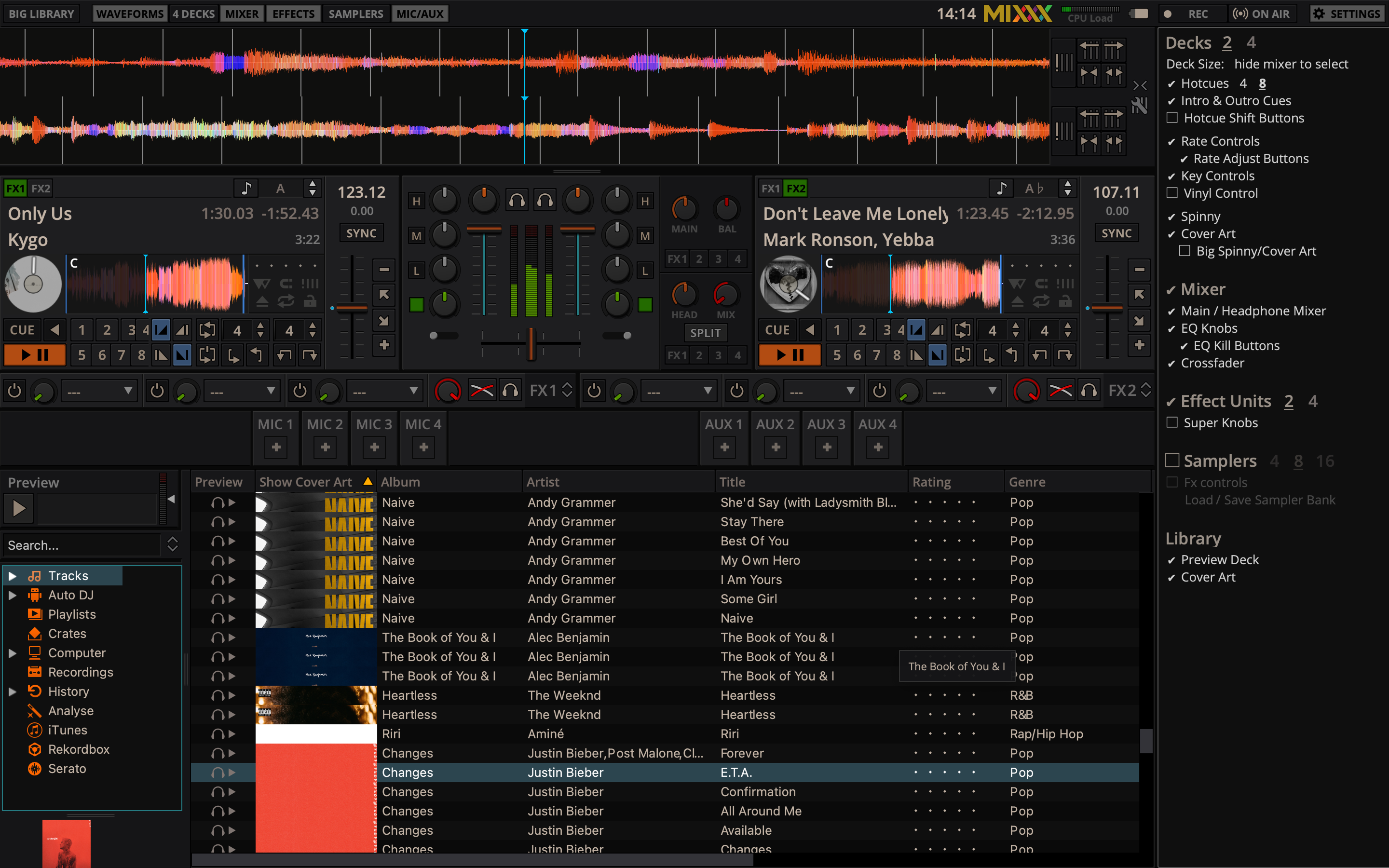
Don't mistake free for basic, though. Mixxx is genuinely capable: it runs on Windows, Mac and Linux (the only major DJ app on Linux), supports up to four decks, has effects, looping, hot cues, key detection, DVS support for timecode vinyl, and even built-in live broadcasting and recording. It works with a wide range of DJ controllers out of the box.
So Mixxx removes the cost barrier to learning to DJ entirely — you can download it today and mix with your laptop keyboard or a controller for nothing. This guide covers organising your library, the performance workflow, its features, and connecting hardware. And the universal DJ skills in our Techniques section apply just the same — Mixxx is a real platform to learn them on.
02
Your library & analysis
Mixxx works from your music files — import them and it builds a library you organise into playlists and crates, analysing each track to detect BPM, build a beat-grid, and detect key. Analysis is essential (it powers sync, quantize, key mixing and the waveforms), so analyse your collection before a gig.
Organise into playlists and crates by purpose — warm-up, peak, by genre or energy — so the right track is easy to find live (our Organize Your DJ Library guide covers this in depth). Mixxx shows BPM and key, supports searching and filtering, and can even read and write to your existing iTunes, Traktor, rekordbox or Serato libraries to help you migrate or share collections.
As always, clean, well-tagged, fully-analysed files are the foundation. Mixxx's analysis is solid, and for important tracks it's worth spot-checking the beat-grid (older songs or live drums can fool any auto-detection) and fixing it with Mixxx's grid tools. Get your library prepared properly and Mixxx's features work smoothly on top — all for free.
03
Cues, loops & the workflow
Mixxx has the full performance toolkit you'd expect. Set hot cues on the key moments of your tracks — they save with the track and map to your controller's pads, ready to launch instantly. Loops (auto and manual) let you repeat a section to extend an intro or build tension. There's beat jump, a sampler, and more.
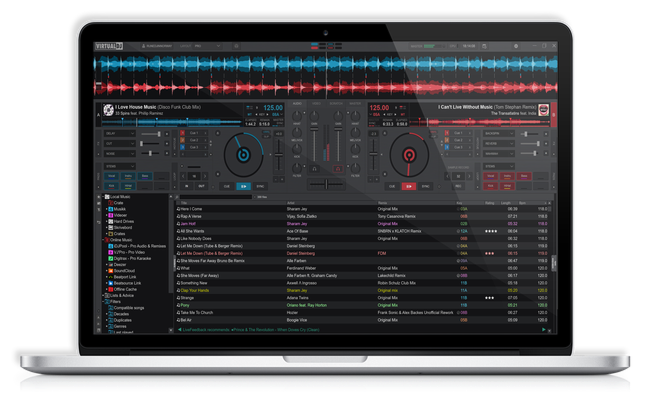
The interface is clean and clear, with stacked waveforms so you can see both tracks lining up — straightforward enough for beginners. Sync and quantize keep things locked while you learn, though beatmatching by ear is the skill worth building (see our When to Use Sync guide). Mixxx is also quite customisable, with community skins and mappings, but the default layout is a great place to start.
The universal skills — beatmatching, EQ mixing, phrasing, tasteful effects — are identical in Mixxx to any other software (our Techniques section covers them), and Mixxx gives you a capable, no-cost environment to perform them in. The cue-and-loop tools let you go from simply blending tracks to really performing them — and you're doing it on software that cost you nothing.
04
Effects & features
For free software, Mixxx is surprisingly deep. It includes a solid set of effects — filters, echoes, reverbs, flangers and more — that you can apply and chain to add tension and energy to your mixes; used tastefully (our Filters & FX guide covers the principles), they cover everything most DJs need. It supports four decks for layering, key detection and key-shift for harmonic mixing (see our Harmonic Mixing guide), and a sampler for triggering sounds.
Mixxx also supports DVS — controlling digital tracks with real timecode turntables — which is notable for free software and great for anyone wanting to mix with vinyl control on a budget (our turntable guides cover the gear). And because it's open-source, the community continually adds features and fixes, and you can extend it with custom controller mappings and skins.
None of this is locked behind a paywall — it's all included. So while Mixxx may lack some of the flashiest cutting-edge features of the latest commercial apps (like the most advanced real-time stems), it covers the full core of DJing, and then some, for free. For learning every fundamental and even gigging on a budget, it's remarkably complete.
05
Hardware, broadcasting & habits
Mixxx works with a wide range of DJ controllers out of the box, and the community maintains mappings for many more — so whatever affordable controller you start with, there's a good chance Mixxx supports it, mapping the decks, mixer and effects to your hardware. You can also mix with just the keyboard to learn. A standout feature is built-in live broadcasting and recording: Mixxx can stream your set directly to internet radio (Icecast/Shoutcast) and record your mixes, no extra software needed — great for sharing and improving (see our Record & Stream guide).
The usual habits keep your sets solid: analyse and grid your library before gigs, back up your Mixxx library and settings, keep your computer performance-ready, and update Mixxx for the latest improvements.
And remember the software is only half the equation — the fundamentals (beatmatching, gain and EQ, phrasing, reading the room) make you a good DJ, and they're the same in Mixxx as in any paid app. Build them with our Techniques section, and let Mixxx be the capable, completely free environment you learn and perform in. For removing every cost barrier to DJing while still being genuinely powerful, nothing beats it.